
Environment Maps
Three.js에서 Environment Map(환경 맵) 은 장면 전체에 사실적인 조명과 반사를 적용하는 데 사용됩니다. 이 문서는 다양한 환경 맵 형식, 로딩 및 적용 기법, 생성 도구까지 정리한 가이드입니다.
🔧 Setup
- 모델: GLTF Sample Models에서 제공하는 Flight Helmet
- 경로: /static/models/FlightHelmet/glTF/FlightHelmet.gltf
- 초기 장면: 하얀 TorusKnot, lil-gui
import { GLTFLoader } from 'three/examples/jsm/loaders/GLTFLoader.js';

const gltfLoader = new GLTFLoader();

// 모델 로딩 및 장면에 추가
gltfLoader.load('/models/FlightHelmet/glTF/FlightHelmet.gltf', (gltf) => {
  gltf.scene.scale.set(10, 10, 10); // 모델이 작으므로 크기 조정
  scene.add(gltf.scene);
});
🧊 Cube Texture Environment Map (큐브 텍스처 환경 맵)
큐브 텍스처는 6장의 이미지(px, nx, py, ny, pz, nz)로 구성됩니다.

const cubeTextureLoader = new THREE.CubeTextureLoader();

const environmentMap = cubeTextureLoader.load([
  '/environmentMaps/0/px.png',
  '/environmentMaps/0/nx.png',
  '/environmentMaps/0/py.png',
  '/environmentMaps/0/ny.png',
  '/environmentMaps/0/pz.png',
  '/environmentMaps/0/nz.png',
]);

scene.background = environmentMap;
scene.environment = environmentMap; // 조명 효과에도 사용됨
토러스 노트 객체에 적용:
const torusKnot = new THREE.Mesh(
  new THREE.TorusKnotGeometry(1, 0.4, 100, 16),
  new THREE.MeshStandardMaterial({
    roughness: 0.3, // 표면 거칠기
    metalness: 1, // 금속성
    color: 0xaaaaaa,
  }),
);
torusKnot.position.set(-4, 4, 0);
scene.add(torusKnot);
🛠️ 환경 맵 설정값 조절
scene.environmentIntensity = 1; // environmentMap 밝기
scene.backgroundBlurriness = 0; // environmentMap 뿌연정도(blur)
scene.backgroundIntensity = 1; // 배경 밝기

// lil-gui 추가
const gui = new GUI();
guij.add(scene, 'environmentIntensity').min(0).max(10).step(0.001);
guij.add(scene, 'backgroundBlurriness').min(0).max(1).step(0.001);
guij.add(scene, 'backgroundIntensity').min(0).max(10).step(0.001);
회전 제어 (Y축만 권장):
gui
  .add(scene.backgroundRotation, 'y')
  .min(0)
  .max(Math.PI * 2)
  .step(0.001)
  .name('backgroundRotationY');
gui
  .add(scene.environmentRotation, 'y')
  .min(0)
  .max(Math.PI * 2)
  .step(0.001)
  .name('environmentRotationY');
📷 HDRI Equirectangular Environment Map
- 포맷: .hdr (High Dynamic Range)
- 투영 방식: Equirectangular (360도 구면 투영)
- 큐브 텍스처에 비해 크기가 크다.
import { RGBELoader } from 'three/examples/jsm/loaders/RGBELoader.js';
const rgbeLoader = new RGBELoader();

rgbeLoader.load('/environmentMaps/0/2k.hdr', (environmentMap) => {
  environmentMap.mapping = THREE.EquirectangularReflectionMapping;
  scene.background = environmentMap;
  scene.environment = environmentMap;
});
🧵 Blender로 HDRI 환경 맵 만들기
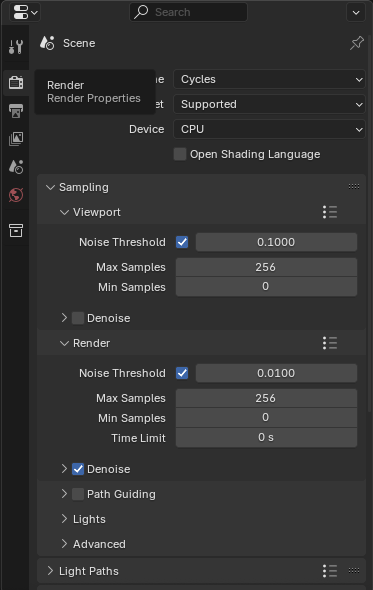
- 렌더 엔진: Cycles (필수)
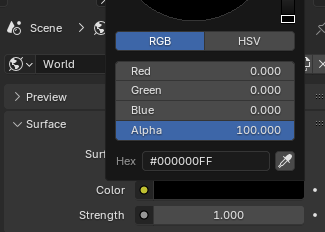
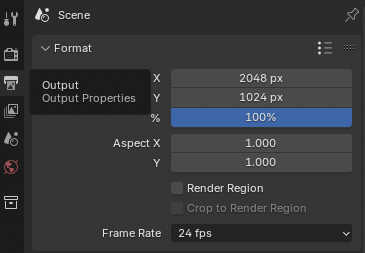
- 출력 해상도: 2048x1024 (개발자와 디자이너를 위해 거듭제곱값을 쓰는 관행이 있음.)
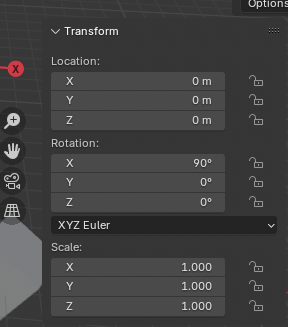
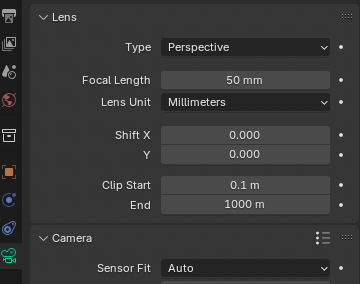

- 카메라:
- 렌즈: Panoramic > Equirectangular

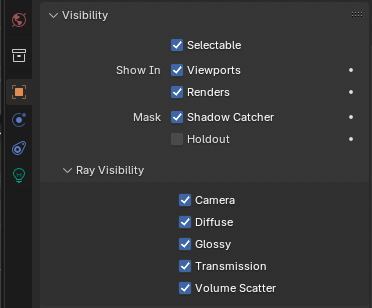
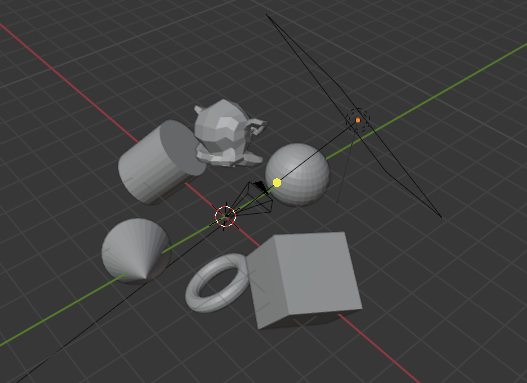
- 라이트: 3개 (중앙으로 향하게, 서로 다른 색상 적용)
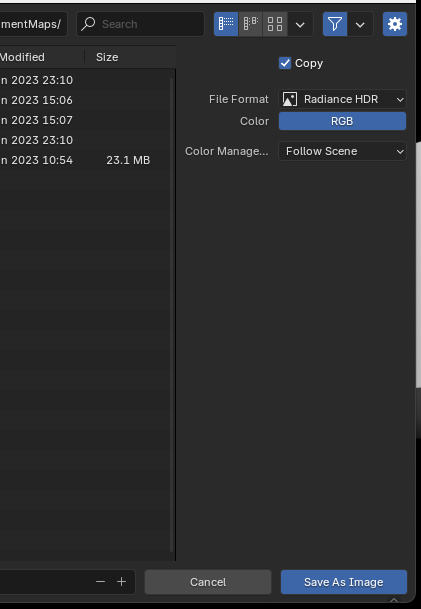
- 렌더 후: ALT + S → Radiance HDR (.hdr)로 저장
Three.js 적용:
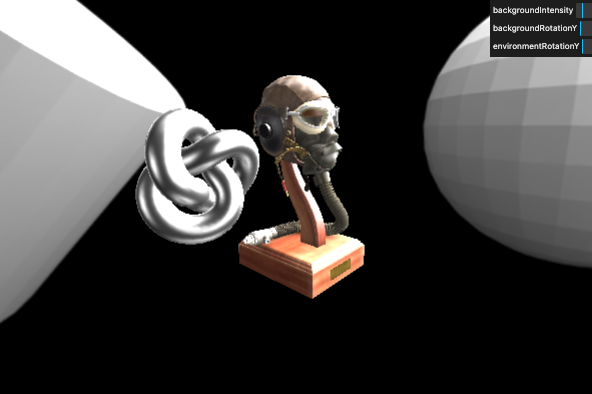
rgbeLoader.load('/environmentMaps/studio-2k.hdr', (environmentMap) => {
  environmentMap.mapping = THREE.EquirectangularReflectionMapping;
  scene.environment = environmentMap;
  // scene.background = environmentMap  // 비활성화하여 배경은 제거
});
🧠 AI로 생성한 환경 맵
1. NVIDIA Canvas (링크)

- .exr 포맷 → EXRLoader 사용 필요
import { EXRLoader } from 'three/addons/loaders/EXRLoader.js';
const exrLoader = new EXRLoader();

exrLoader.load('/environmentMaps/nvidiaCanvas-4k.exr', (environmentMap) => {
  environmentMap.mapping = THREE.EquirectangularReflectionMapping;
  scene.background = environmentMap;
  scene.environment = environmentMap;
});
2. Blockade Labs Skybox (링크)
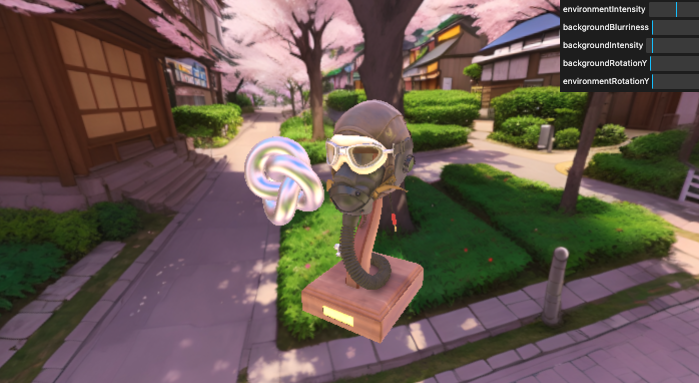
- .jpg (LDR) → TextureLoader 사용
const textureLoader = new THREE.TextureLoader();
const environmentMap = textureLoader.load(
  '/environmentMaps/blockadesLabsSkybox/anime.jpg',
);

environmentMap.mapping = THREE.EquirectangularReflectionMapping;
environmentMap.colorSpace = THREE.SRGBColorSpace;

scene.background = environmentMap;
scene.environment = environmentMap;
🌍 Ground Projected Skybox
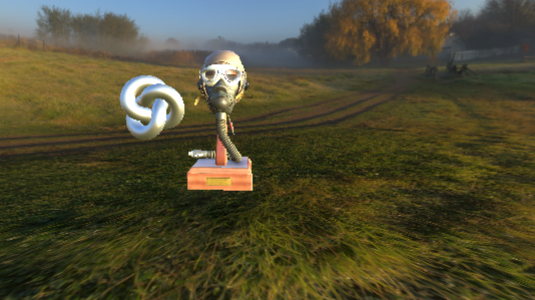
배경과 지면 연결감을 위해 사용
import { GroundedSkybox } from 'three/addons/objects/GroundedSkybox.js';

rgbeLoader.load('/environmentMaps/2/2k.hdr', (environmentMap) => {
  environmentMap.mapping = THREE.EquirectangularReflectionMapping;
  scene.environment = environmentMap;

  const skybox = new GroundedSkybox(environmentMap, 15, 70);
  skybox.position.y = 15;
  scene.add(skybox);
});
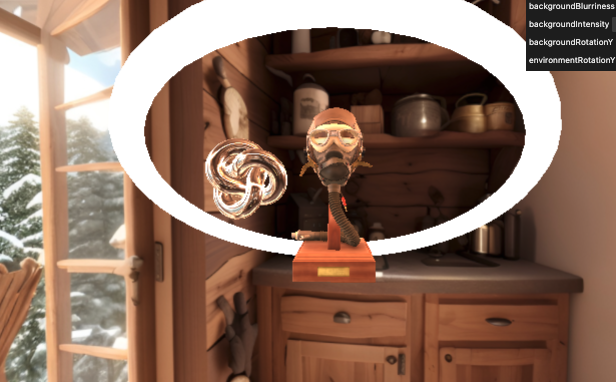
🔁 Real-time Environment Map
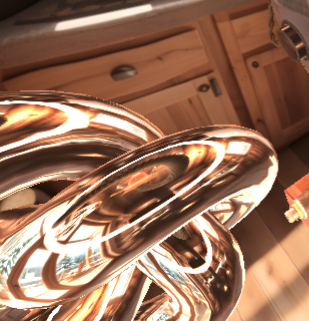
회전하는 donut이 실시간 반사 및 조명에 영향을 줌
// CubeCamera가 렌더링한 결과(큐브맵)를 저장하는 버퍼
const cubeRenderTarget = new THREE.WebGLCubeRenderTarget(256, {  // 총 여섯 면이므로 6배가 된다. 너무 큰 값을 넣으면 성능저하가 일어난다.
  type: THREE.HalfFloatType, // float는 32bits이므로, 16bits 사용 (성능을 고려)
});
const cubeCamera = new THREE.CubeCamera(0.1, 100, cubeRenderTarget);
cubeCamera.layers.set(1); // cubeCamera는 layer 1만 렌더링

scene.environment = cubeRenderTarget.texture; // 간접적으로 광원의 역할을 함.

const holyDonut = new THREE.Mesh(
  new THREE.TorusGeometry(8, 0.5),
  new THREE.MeshBasicMaterial({ color: new THREE.Color(10, 4, 2) }),
);
holyDonut.layers.enable(1); // holyDonut은 원래 기본 카메라 + cubeCamera 모두에 보임. 그래서 cubeCamera에만 보이게 설정
scene.add(holyDonut);

// Tick 함수 내에서 회전 및 렌더 업데이트
cubeCamera.update(renderer, scene); // cubeCamera로 씬을 렌더링해 cubeRenderTarget을 최신 상태로 유지
실시간 환경 맵은 매 프레임마다 6번의 렌더링이 발생하므로 성능에 주의해야 합니다.
환경 맵은 단순한 배경 이상으로, 사실적인 조명과 반사, 고급 효과, 디버깅용 도구로까지 활용됩니다. 실시간 환경 맵, AI 생성, Blender 제작까지 다양한 옵션을 학습하고 테스트해 보세요.
더 많은 예제와 업데이트는:
import * as THREE from 'three';
import { OrbitControls } from 'three/examples/jsm/controls/OrbitControls.js';
import GUI from 'lil-gui';
import {
  EXRLoader,
  GLTFLoader,
  RGBELoader,
} from 'three/examples/jsm/Addons.js';
import { GroundedSkybox } from 'three/addons/objects/GroundedSkybox.js';

/**
 * Loader
 */
const glTFLoader = new GLTFLoader();
const cubeTextureLoader = new THREE.CubeTextureLoader(); // format jpg, png...
const rgbeLoader = new RGBELoader(); // format hdr
const exrLoader = new EXRLoader(); // format exr
const textureLoader = new THREE.TextureLoader();

/**
 * Base
 */
// Debug
const gui = new GUI();

// Canvas
const canvas = document.querySelector('canvas.webgl');

// Scene
const scene = new THREE.Scene();

/**
 * Environment map
 */

scene.environmentIntensity = 5; // environmentMap 밝기
scene.backgroundBlurriness = 0; // environmentMap 뿌연정도(blur)
scene.backgroundIntensity = 1; // 배경 밝기
// scene.backgroundRotation.x = 1; // 배경 회전
// scene.environmentRotation.x = 1; // light 회전

gui.add(scene, 'environmentIntensity').min(0).max(10).step(0.01);
gui.add(scene, 'backgroundBlurriness').min(0).max(1).step(0.001);
gui.add(scene, 'backgroundIntensity').min(0).max(10).step(0.01);
gui
  .add(scene.backgroundRotation, 'y')
  .min(0)
  .max(Math.PI * 2)
  .step(0.01)
  .name('backgroundRotationY');
gui
  .add(scene.environmentRotation, 'y')
  .min(0)
  .max(Math.PI * 2)
  .step(0.01)
  .name('environmentRotationY');

// LDR cub texture
// const environmentMap = cubeTextureLoader.load([
//   '/environmentMaps/0/px.png',
//   '/environmentMaps/0/nx.png',
//   '/environmentMaps/0/py.png',
//   '/environmentMaps/0/ny.png',
//   '/environmentMaps/0/pz.png',
//   '/environmentMaps/0/nz.png',
// ]);

// scene.environment = environmentMap; // Light도 가져오기
// scene.background = environmentMap; // background 이미지 적용

// HDR (RGBE) equirectangular(정방형 투영법)
// rgbeLoader.load('/environmentMaps/blender-2k.hdr', (environmentMap) => {
//   environmentMap.mapping = THREE.EquirectangularReflectionMapping;

//   scene.background = environmentMap;
//   scene.environment = environmentMap;
// });

// HDR (EXR) equirectangular (정방형 투영법)
// exrLoader.load('/environmentMaps/nvidiaCanvas-4k.exr', (environmentMap) => {
//   environmentMap.mapping = THREE.EquirectangularReflectionMapping;

//   scene.background = environmentMap;
//   scene.environment = environmentMap;
// });

// LDR equirectangular
// const environmentMap = textureLoader.load(
//   '/environmentMaps/blockadesLabsSkybox/anime_art_style_japan_streets_with_cherry_blossom_.jpg',
// );
// environmentMap.mapping = THREE.EquirectangularReflectionMapping;
// environmentMap.colorSpace = THREE.SRGBColorSpace;
// scene.background = environmentMap;
// scene.environment = environmentMap;

// Ground project sky box
// rgbeLoader.load('/environmentMaps/1/2k.hdr', (environmentMap) => {
//   environmentMap.mapping = THREE.EquirectangularReflectionMapping;
//   scene.environment = environmentMap;

//   // SkyBox
//   const skybox = new GroundedSkybox(environmentMap, 15, 70); // (map, height, radius, resolution 해상도) 배경과 지면 연결
//   //   skybox.material.wireframe = true;
//   //     skybox.radius = 120
//   //     skybox.height = 11
//   //     skybox.scale.setScalar(50)
//   skybox.position.y = 15;
//   scene.add(skybox);

//   gui.add(skybox, 'radius', 1, 200, 0.1).name('skyboxRadius');
//   gui.add(skybox, 'height', 1, 100, 0.1).name('skyboxHeight');
// });

/**
 * Real time environment map
 */
// Base environment map
const environmentMap = textureLoader.load(
  '/environmentMaps/blockadesLabsSkybox/interior_views_cozy_wood_cabin_with_cauldron_and_p.jpg',
);
environmentMap.mapping = THREE.EquirectangularReflectionMapping;
environmentMap.colorSpace = THREE.SRGBColorSpace;

scene.background = environmentMap;

/**
 * Torus Knot
 */
const torusKnot = new THREE.Mesh(
  new THREE.TorusKnotGeometry(1, 0.4, 100, 16),
  new THREE.MeshStandardMaterial({
    roughness: 0,
    metalness: 1,
    color: 0xaaaaaa,
  }),
);

torusKnot.position.x = -4;
torusKnot.position.y = 4;
scene.add(torusKnot);

// Holy donut
const holyDonut = new THREE.Mesh(
  new THREE.TorusGeometry(8, 0.5),
  new THREE.MeshBasicMaterial({ color: new THREE.Color(10, 4, 2) }),
);
holyDonut.layers.enable(1); // cubeCamera에만 보이게 설정
holyDonut.position.y = 3.5;
scene.add(holyDonut);

// Cube render target: CubeCamera가 렌더링한 결과(큐브맵)를 저장하는 버퍼
const cubeRenderTarget = new THREE.WebGLCubeRenderTarget(
  256, // 6면 이므로 6배가 된다. 너무 큰 값을 넣으면 안된다.
  {
    type: THREE.HalfFloatType, // float는 32bits이므로, 16bits 사용
  },
);

scene.environment = cubeRenderTarget.texture; // 씬 내의 모든 반사/조명에 사용할 환경맵

// Cube camera: 여섯 방향을 찍어 큐브맵을 만드는 가상 카메라
const cubeCamera = new THREE.CubeCamera(0.1, 100, cubeRenderTarget);
cubeCamera.layers.set(1); // cubeCamera는 layer 1만 렌더링

/**
 * Models
 */
glTFLoader.load('/models/FlightHelmet/glTF/FlightHelmet.gltf', (gltf) => {
  gltf.scene.scale.set(10, 10, 10);
  scene.add(gltf.scene);
});

/**
 * Sizes
 */
const sizes = {
  width: window.innerWidth,
  height: window.innerHeight,
};

window.addEventListener('resize', () => {
  // Update sizes
  sizes.width = window.innerWidth;
  sizes.height = window.innerHeight;

  // Update camera
  camera.aspect = sizes.width / sizes.height;
  camera.updateProjectionMatrix();

  // Update renderer
  renderer.setSize(sizes.width, sizes.height);
  renderer.setPixelRatio(Math.min(window.devicePixelRatio, 2));
});

/**
 * Camera
 */
// Base camera
const camera = new THREE.PerspectiveCamera(
  75,
  sizes.width / sizes.height,
  0.1,
  100,
);
camera.position.set(4, 5, 4);
scene.add(camera);

// Controls
const controls = new OrbitControls(camera, canvas);
controls.target.y = 3.5;
controls.enableDamping = true;

/**
 * Renderer
 */
const renderer = new THREE.WebGLRenderer({
  canvas: canvas,
});
renderer.setSize(sizes.width, sizes.height);
renderer.setPixelRatio(Math.min(window.devicePixelRatio, 2));

/**
 * Animate
 */
const clock = new THREE.Clock();
const tick = () => {
  // Time
  const elapsedTime = clock.getElapsedTime();

  // Real time environment map
  if (holyDonut) {
    holyDonut.rotation.x = Math.sin(elapsedTime) * 2;

    cubeCamera.update(renderer, scene); // 	cubeCamera로 씬을 렌더링해 cubeRenderTarget을 최신 상태로 유지
  }

  // Update controls
  controls.update();

  // Render
  renderer.render(scene, camera);

  // Call tick again on the next frame
  window.requestAnimationFrame(tick);
};

tick();'Graphic > ThreeJS' 카테고리의 다른 글
| 26. 프로젝트 구조화(Code structuring for bigger projects) (4) | 2025.08.02 |
|---|---|
| 25 Realistic render (2) | 2025.07.31 |
| 22 Raycaster와 MouseEvent (3) | 2025.07.29 |
| 21 모델 불러오기(Imported models) (4) | 2025.07.29 |
| 20 물리엔진(Physics) (3) | 2025.07.29 |


