
Three.js 프로젝트 구조화 수업 정리
학습 목표
- JavaScript 클래스 및 모듈을 활용해 Three.js 프로젝트를 구조화하는 방법을 익힌다.
- 유지보수, 확장성, 재사용성을 고려한 OOP 기반 설계 방식을 학습한다.
- 싱글톤, 이벤트 시스템(EventEmitter), 리소스 로딩 등 복잡한 구조를 정리한다.
📁 프로젝트 구조 개요
/src
├── Experience.js            # 메인 싱글톤 클래스
├── script.js                # 엔트리포인트
├── sources.js              # 리소스 정의 배열
│
├── Experience/
│   ├── Utils/
│   │   ├── Debug.js
│   │   ├── EventEmitter.js
│   │   ├── Resources.js
│   │   ├── Sizes.js
│   │   └── Time.js
│   │
│   ├── World/
│   │   ├── Environment.js
│   │   ├── Floor.js
│   │   ├── Fox.js
│   │   └── World.js
│   │
│   ├── Camera.js
│   └── Renderer.js
📦 모듈과 클래스 구조 설명
1. script.js
- canvas를 선택해 Experience 클래스에 전달하며 앱을 시작하는 진입점.
import Experience from './Experience/Experience.js';

const experience = new Experience(document.querySelector('canvas.webgl'));
2. Experience.js
역할: 전체 WebGL 경험을 초기화, 저장, 제어하는 메인 싱글톤 클래스
let instance = null;

export default class Experience {
  constructor(canvas) {
    if (instance) return instance;
    instance = this;

    window.experience = this;

    this.canvas = canvas;

    this.debug = new Debug();
    this.sizes = new Sizes();
    this.time = new Time();
    this.scene = new THREE.Scene();
    this.resources = new Resources(sources);

    this.camera = new Camera();
    this.renderer = new Renderer();
    this.world = new World();

    this.sizes.on('resize', () => this.resize());
    this.time.on('tick', () => this.update());
  }

  resize() {
    this.camera.resize();
    this.renderer.resize();
  }

  update() {
    this.camera.update();
    this.world.update();
    this.renderer.update();
  }

  destroy() {
    this.sizes.off('resize');
    this.time.off('tick');
    this.scene.traverse((child) => {
      if (child instanceof THREE.Mesh) {
        child.geometry.dispose();
        for (const key in child.material) {
          const value = child.material[key];
          if (value && typeof value.dispose === 'function') value.dispose();
        }
      }
    });
    this.camera.controls.dispose();
    this.renderer.instance.dispose();
    if (this.debug.active) this.debug.ui.destroy();
  }
}
3. Utils/
Sizes.js
역할: 화면 크기 및 픽셀 밀도 관리 + resize 이벤트 발생
export default class Sizes extends EventEmitter {
  constructor() {
    super();
    this.width = window.innerWidth;
    this.height = window.innerHeight;
    this.pixelRatio = Math.min(window.devicePixelRatio, 2);

    window.addEventListener('resize', () => {
      this.width = window.innerWidth;
      this.height = window.innerHeight;
      this.pixelRatio = Math.min(window.devicePixelRatio, 2);
      this.trigger('resize');
    });
  }
}
Time.js
역할: 경과 시간, 델타 프레임 계산 + tick 이벤트 발생
export default class Time extends EventEmitter {
  constructor() {
    super();
    this.start = Date.now();
    this.current = this.start;
    this.elapsed = 0;
    this.delta = 16;

    window.requestAnimationFrame(() => this.tick());
  }

  tick() {
    const currentTime = Date.now();
    this.delta = currentTime - this.current;
    this.current = currentTime;
    this.elapsed = this.current - this.start;
    this.trigger('tick');
    window.requestAnimationFrame(() => this.tick());
  }
}
EventEmitter.js
역할: 커스텀 이벤트 시스템 구현. on, off, trigger 지원
해당 구현은 재사용 가능한 옵저버 패턴으로, Three.js 외 다른 프로젝트에서도 그대로 활용 가능.
Resources.js
역할: 다양한 타입의 리소스를 로드하고, ready 이벤트를 발생시킴
export default class Resources extends EventEmitter {
  constructor(sources) {
    super();
    this.sources = sources;
    this.items = {};
    this.toLoad = this.sources.length;
    this.loaded = 0;

    this.setLoaders();
    this.startLoading();
  }

  setLoaders() {
    this.loaders = {
      gltfLoader: new GLTFLoader(),
      textureLoader: new THREE.TextureLoader(),
      cubeTextureLoader: new THREE.CubeTextureLoader(),
    };
  }

  startLoading() {
    for (const source of this.sources) {
      const loader = this.loaders[`${source.type}Loader`];
      loader.load(source.path, (file) => {
        this.sourceLoaded(source, file);
      });
    }
  }

  sourceLoaded(source, file) {
    this.items[source.name] = file;
    this.loaded++;
    if (this.loaded === this.toLoad) this.trigger('ready');
  }
}
4. Camera.js
역할: PerspectiveCamera와 OrbitControls 설정, resize/update 메서드 포함
export default class Camera {
  constructor() {
    this.experience = new Experience();
    this.sizes = this.experience.sizes;
    this.scene = this.experience.scene;
    this.canvas = this.experience.canvas;

    this.setInstance();
    this.setControls();
  }

  setInstance() {
    this.instance = new THREE.PerspectiveCamera(
      35,
      this.sizes.width / this.sizes.height,
      0.1,
      100,
    );
    this.instance.position.set(6, 4, 8);
    this.scene.add(this.instance);
  }

  setControls() {
    this.controls = new OrbitControls(this.instance, this.canvas);
    this.controls.enableDamping = true;
  }

  resize() {
    this.instance.aspect = this.sizes.width / this.sizes.height;
    this.instance.updateProjectionMatrix();
  }

  update() {
    this.controls.update();
  }
}
5. Renderer.js
역할: WebGLRenderer 설정 및 업데이트
export default class Renderer {
  constructor() {
    this.experience = new Experience();
    this.canvas = this.experience.canvas;
    this.sizes = this.experience.sizes;
    this.scene = this.experience.scene;
    this.camera = this.experience.camera;

    this.setInstance();
  }

  setInstance() {
    this.instance = new THREE.WebGLRenderer({
      canvas: this.canvas,
      antialias: true,
    });
    this.instance.setSize(this.sizes.width, this.sizes.height);
    this.instance.setPixelRatio(this.sizes.pixelRatio);
    this.instance.toneMapping = THREE.CineonToneMapping;
    this.instance.toneMappingExposure = 1.75;
    this.instance.shadowMap.enabled = true;
    this.instance.shadowMap.type = THREE.PCFSoftShadowMap;
  }

  resize() {
    this.instance.setSize(this.sizes.width, this.sizes.height);
    this.instance.setPixelRatio(this.sizes.pixelRatio);
  }

  update() {
    this.instance.render(this.scene, this.camera.instance);
  }
}
6. World/World.js
역할: Floor, Fox, Environment 구성 요소 초기화. 리소스가 준비된 후 구성
export default class World {
  constructor() {
    this.experience = new Experience();
    this.scene = this.experience.scene;
    this.resources = this.experience.resources;

    this.resources.on('ready', () => {
      this.floor = new Floor();
      this.fox = new Fox();
      this.environment = new Environment();
    });
  }

  update() {
    if (this.fox) this.fox.update();
  }
}
Floor, Environment, Fox 클래스도 각각의 scene, resources, debug에 접근하여 설정
🧪 디버깅 시스템 (lil-gui)
- #debug URL 해시가 있을 경우만 활성화
- Debug.js에서 this.ui = new GUI()로 인스턴스 생성
- 각 클래스는 디버그 폴더(addFolder)를 만들고 .add(...)로 속성을 제어
🧨 destroy() 처리
- 모든 event listener 제거 (off() 호출)
- 장면 내 Mesh의 geometry/material dispose 처리
- OrbitControls, renderer, lil-gui UI 정리
✅ 요약
- 모듈화, 클래스 구조화는 Three.js 같은 대규모 WebGL 프로젝트에 필수
- 싱글톤 패턴, EventEmitter, 리소스 관리 시스템은 확장성과 유지보수성에 매우 유용
- 디버그 UI, destroy 로직 등 실전 경험에서 유용한 패턴들을 적극 활용
🔗 참고
JavaScript 클래스, new 키워드, this 바인딩, 싱글톤 패턴 동작 원리
new 키워드 동작 순서
- new 키워드가 클래스 생성자(constructor)를 호출하면,
- JavaScript 엔진은 내부적으로 비어 있는 this 객체를 먼저 생성합니다.
- 이 this 객체가 constructor 함수에 암묵적으로 주입됩니다.
- constructor 함수 내부에서는 이 this 객체에 필드(프로퍼티)들을 할당합니다.
- constructor 실행이 끝나면, 일반적으로 자동으로 this가 반환됩니다.
- 단, constructor에서 객체를 명시적으로 return 하면 그 객체가 대신 반환됩니다.
class Person {
  constructor(name) {
    this.name = name;
  }
}

const p = new Person("Heeseong"); // 1~5의 흐름이 모두 자동으로 처리됨
이 때문에 constructor의 중간에서 this.name = name과 같은 코드가 오류 없이 정상 실행됩니다. this는 이미 존재하기 때문입니다.
let instance = null;을 export하지 않아도 괜찮은 이유
🔹 1. export는 외부 공개용이지, 전역 공유용이 아니다
- export는 특정 변수나 클래스를 외부 파일에서 import할 수 있도록 공개하는 문법이다.
- 따라서 같은 파일 내에서 사용하는 instance 변수는 export할 필요가 없다.
// Example.js
let secret = 123; // 외부 접근 불가
export const visible = 456; // 외부에서 import 가능
🔹 2. ES 모듈은 "한 번만 실행되고 캐싱된다"
- ES 모듈 시스템(ESM)은 처음 import될 때 한 번만 평가되고, 그 상태가 모듈 캐시에 저장됩니다.
- 따라서 let instance = null 같은 값도 파일 스코프 내에서 지속적으로 유지됩니다.
🔹 3. 그래서 싱글톤 구현이 가능하다
// Experience.js
let instance = null;

export default class Experience {
  constructor() {
    if (instance) return instance;
    instance = this;

    this.canvas = canvas;
    this.scene = new THREE.Scene();
    // ...
  }
}
이처럼 외부에서 new Experience()를 몇 번 호출하더라도 항상 동일한 instance가 반환되며, 내부 초기화 코드는 최초 한 번만 실행됩니다.
updateCanvas(canvas)는 어떻게 동작하는가?
updateCanvas(canvas) {
  this.canvas = canvas;
}
이 메서드는 기존 인스턴스의 canvas 값을 바꾸는 것이므로 정상적으로 작동합니다.
하지만 new Experience(newCanvas)로 새로 생성하더라도 instance가 이미 있으므로 생성자 내부 초기화 코드는 다시 실행되지 않습니다.
이런 경우엔 다음과 같은 방식이 좋습니다:
const exp = new Experience();
exp.updateCanvas(newCanvas); // 수동 갱신
또는 다음처럼 getInstance() 함수를 따로 만들어 관리하는 방식도 있습니다:
let instance = null;

export function getExperience(canvas) {
  if (!instance) instance = new Experience(canvas);
  return instance;
}
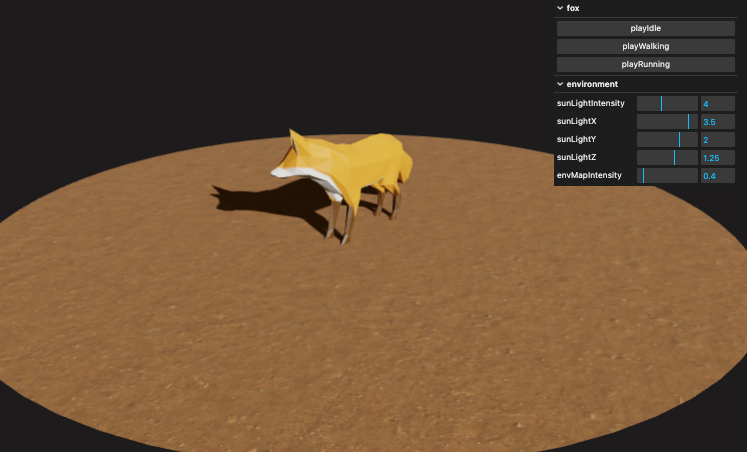
※ 폴더 구조는 최상단 폴더 구조 참조
// script.js
import Experience from './Experience/Experience';

const experience = new Experience(document.querySelector('canvas.webgl'));
Experience
// Experience/Experience.js
import * as THREE from 'three';

// 유틸리티 및 하위 시스템 모듈들
import Sizes from './Utils/Sizes';
import Time from './Utils/Time';
import Camera from './Camera';
import Renderer from './Renderer';
import World from './World/World';
import Resources from './Utils/Resources';
import sources from './sources';
import Debug from './Utils/Debug';

// 싱글턴 패턴을 위한 외부 스코프 변수
let instance = null;

export default class Experience {
  constructor(canvas) {
    /**
     * 🔁 싱글턴 패턴 적용
     * - 여러 곳에서 Experience를 생성해도 항상 동일한 인스턴스를 반환
     * - 내부에서 new Experience()를 여러 번 호출해도 중복 생성되지 않도록 막음
     */
    if (instance) {
      return instance;
    }
    instance = this;

    // 디버깅용 전역 접근 (개발 시 콘솔에서 window.experience 확인 가능)
    window.experience = this;

    // 🔧 옵션: 외부에서 전달된 캔버스 DOM 요소 저장
    this.canvas = canvas;

    // 🧱 시스템 구성 요소 초기화 (순서 중요!)
    this.debug = new Debug();                            // 디버그 UI 설정
    this.sizes = new Sizes();                            // 창 크기 관리 + resize 이벤트
    this.time = new Time();                              // 매 프레임마다 tick 이벤트 발생
    this.scene = new THREE.Scene();                      // 3D 씬 객체
    this.resources = new Resources(sources);             // 모델/텍스처 등 외부 리소스 로더
    this.camera = new Camera();                          // 카메라 설정 (OrbitControls 포함)
    this.renderer = new Renderer();                      // WebGLRenderer 설정
    this.world = new World();                            // 실제 씬 구성 요소들 (mesh, light 등)

    // 📏 초기 크기 설정 + resize 이벤트 연결
    this.resize();
    this.sizes.on('resize', () => {
      this.resize();
    });

    // 🎮 매 프레임마다 update 이벤트 연결 (렌더링 루프)
    this.time.on('tick', () => {
      this.update();
    });
  }

  resize() {
    // 화면 크기 변경 시 각 요소에도 반영
    this.camera.resize();
    this.renderer.resize();
  }

  update() {
    // 매 프레임마다 업데이트 수행
    this.camera.update();    // OrbitControls 등 카메라 상태 갱신
    this.world.update();     // 애니메이션 or 물체 업데이트
    this.renderer.update();  // 화면 렌더링 수행
  }

  destroy() {
    /**
     * 💥 씬 종료 시 리소스 정리
     * - 메모리 누수 방지
     * - 이벤트 해제, GPU 리소스 해제
     */

    // 이벤트 해제
    this.sizes.off('resize');
    this.time.off('tick');

    // 씬 내 모든 객체를 순회하며 메모리 해제
    this.scene.traverse((child) => {
      if (child instanceof THREE.Mesh) {
        // 지오메트리 해제
        child.geometry.dispose();

        // 머티리얼 해제
        for (const key in child.material) {
          const value = child.material[key];
          if (value && typeof value.dispose === 'function') {
            value.dispose();
          }
        }
      }
    });

    // 컨트롤 및 렌더러 해제
    this.camera.controls.dispose();
    this.renderer.instance.dispose();

    // 디버그 UI 해제
    if (this.debug.active) this.debug.ui.destroy();
  }
}
// Experience/Renderer.js
import Experience from './Experience';
import * as THREE from 'three';
export default class Renderer {
constructor() {
this.experience = new Experience();
this.canvas = this.experience.canvas;
this.sizes = this.experience.sizes;
this.scene = this.experience.scene;
this.camera = this.experience.camera;
this.setInstance();
}
setInstance() {
this.instance = new THREE.WebGLRenderer({
canvas: this.canvas,
antialias: true,
});
this.instance.toneMapping = THREE.CineonToneMapping;
this.instance.toneMappingExposure = 1.75;
this.instance.shadowMap.enabled = true;
this.instance.shadowMap.type = THREE.PCFSoftShadowMap;
this.instance.setClearColor('#211d20');
}
resize() {
this.instance.setSize(this.sizes.width, this.sizes.height);
this.instance.setPixelRatio(this.sizes.pixelRatios);
}
update() {
this.instance.render(this.scene, this.camera.instance);
}
}// Experience/Camera.js
import * as THREE from 'three';
import Experience from './Experience';
import { OrbitControls } from 'three/examples/jsm/controls/OrbitControls.js';
export default class Camera {
constructor() {
// Experience 인스턴스에서 필요한 공통 객체들을 받아옴
this.experience = new Experience();
this.sizes = this.experience.sizes; // 창 크기 (width, height)
this.scene = this.experience.scene; // 공용 Three.js Scene
this.canvas = this.experience.canvas; // 렌더링할 캔버스 엘리먼트
// 카메라 설정
this.setInstance();
// OrbitControls 설정 (마우스로 카메라 회전 가능)
this.setOrbitControls();
// 리사이즈 이벤트 연결
this.sizes.on('resize', () => {
this.resize();
});
}
setInstance() {
// 원근 카메라(PerspectiveCamera) 생성
this.instance = new THREE.PerspectiveCamera(
35, // 시야각 (fov)
this.sizes.width / this.sizes.height, // 종횡비 (aspect)
0.1, // near
100, // far
);
// 카메라 위치 지정
this.instance.position.set(6, 4, 8);
// 카메라를 씬에 추가
this.scene.add(this.instance);
}
setOrbitControls() {
// 사용자가 마우스로 카메라를 움직일 수 있도록 컨트롤 추가
this.controls = new OrbitControls(this.instance, this.canvas);
// 부드럽게 움직이는 효과 (내부적으로 damping 처리)
this.controls.enableDamping = true;
}
resize() {
// 창 크기가 바뀌면 카메라 종횡비 업데이트 + 투영행렬 갱신
this.instance.aspect = this.sizes.width / this.sizes.height;
this.instance.updateProjectionMatrix();
}
update() {
// 매 프레임마다 OrbitControls 내부 상태 업데이트 (회전, 줌 등 반영)
this.controls.update();
}
}// Experience/Renderer.js
import Experience from './Experience';
import * as THREE from 'three';
export default class Renderer {
constructor() {
// Experience 인스턴스에서 공유 객체들을 받아옴
this.experience = new Experience();
this.canvas = this.experience.canvas; // 렌더링 대상 캔버스
this.sizes = this.experience.sizes; // 화면 크기 정보 (width, height, pixelRatio)
this.scene = this.experience.scene; // 전역 Scene
this.camera = this.experience.camera; // 전역 Camera
// WebGLRenderer 인스턴스 생성 및 설정
this.setInstance();
}
setInstance() {
// WebGLRenderer는 실제로 GPU에서 장면을 그리는 객체
this.instance = new THREE.WebGLRenderer({
canvas: this.canvas, // 캔버스 지정
antialias: true, // 계단 현상 제거 (MSAA)
});
// 톤 매핑 방식 설정 (물리 기반 렌더링 느낌을 줄 수 있음)
this.instance.toneMapping = THREE.CineonToneMapping;
// 톤 매핑 밝기 조절
this.instance.toneMappingExposure = 1.75;
// 그림자 설정: 그림자 맵 활성화 및 소프트 타입 지정
this.instance.shadowMap.enabled = true;
this.instance.shadowMap.type = THREE.PCFSoftShadowMap;
// 배경색 설정 (WebGL context의 clear color)
this.instance.setClearColor('#211d20');
}
resize() {
// 창 크기 변경 시 렌더러도 새 사이즈에 맞춰 설정
this.instance.setSize(this.sizes.width, this.sizes.height);
// 디바이스의 픽셀 비율에 따라 해상도 조정 (retina 대응)
this.instance.setPixelRatio(this.sizes.pixelRatios);
}
update() {
// 매 프레임마다 씬과 카메라를 이용해 렌더링 수행
this.instance.render(this.scene, this.camera.instance);
}
}// Experience/sources.js
export default [
{
name: 'environmentMapTexture',
type: 'cubeTexture',
path: [
'textures/environmentMap/px.jpg',
'textures/environmentMap/nx.jpg',
'textures/environmentMap/py.jpg',
'textures/environmentMap/ny.jpg',
'textures/environmentMap/pz.jpg',
'textures/environmentMap/nz.jpg',
],
},
{
name: 'grassColorTexture',
type: 'texture',
path: 'textures/dirt/color.jpg',
},
{
name: 'grassNormalTexture',
type: 'texture',
path: 'textures/dirt/normal.jpg',
},
{
name: 'foxModel',
type: 'glTFModel',
path: 'models/Fox/glTF/Fox.gltf',
},
];Utils
// Experience/Utils/Debug.js
import GUI from 'lil-gui';

export default class Debug {
  constructor() {
    /**
     * 🐞 디버그 UI 활성 여부 설정
     * - URL 끝에 #debug가 붙어있으면 활성화
     * - 예: http://localhost:3000/#debug
     */
    this.active = window.location.hash === '#debug';

    // lil-gui 패널 생성
    if (this.active) {
      this.ui = new GUI();
    }
  }
}
// Experience/Utils/EventEmitter.js
export default class EventEmitter {
constructor() {
// 네임스페이스별로 콜백을 저장할 객체
this.callbacks = {};
this.callbacks.base = {};
}
on(_names, callback) {
if (!_names || !callback) return false;
const names = this.resolveNames(_names);
names.forEach((_name) => {
const name = this.resolveName(_name);
if (!(this.callbacks[name.namespace] instanceof Object)) {
this.callbacks[name.namespace] = {};
}
if (!(this.callbacks[name.namespace][name.value] instanceof Array)) {
this.callbacks[name.namespace][name.value] = [];
}
this.callbacks[name.namespace][name.value].push(callback);
});
return this;
}
off(_names) {
if (!_names) return false;
const names = this.resolveNames(_names);
names.forEach((_name) => {
const name = this.resolveName(_name);
if (name.namespace !== 'base' && name.value === '') {
delete this.callbacks[name.namespace];
} else {
if (name.namespace === 'base') {
for (const ns in this.callbacks) {
delete this.callbacks[ns][name.value];
if (Object.keys(this.callbacks[ns]).length === 0) {
delete this.callbacks[ns];
}
}
} else {
delete this.callbacks[name.namespace][name.value];
if (Object.keys(this.callbacks[name.namespace]).length === 0) {
delete this.callbacks[name.namespace];
}
}
}
});
return this;
}
trigger(_name, _args) {
if (!_name) return false;
let finalResult = null;
const args = Array.isArray(_args) ? _args : [];
let name = this.resolveNames(_name)[0];
name = this.resolveName(name);
// 기본 네임스페이스면 전체 순회
if (name.namespace === 'base') {
for (const ns in this.callbacks) {
const cbList = this.callbacks[ns][name.value];
if (Array.isArray(cbList)) {
cbList.forEach((cb) => {
const result = cb.apply(this, args);
if (typeof finalResult === 'undefined') finalResult = result;
});
}
}
} else {
const cbList = this.callbacks[name.namespace]?.[name.value];
if (Array.isArray(cbList)) {
cbList.forEach((cb) => {
const result = cb.apply(this, args);
if (typeof finalResult === 'undefined') finalResult = result;
});
}
}
return finalResult;
}
// 이름 문자열 전처리
resolveNames(_names) {
return _names
.replace(/[^a-zA-Z0-9 ,/.]/g, '')
.replace(/[,/]+/g, ' ')
.split(' ');
}
// 단일 이름을 { value, namespace } 구조로 파싱
resolveName(name) {
const parts = name.split('.');
return {
original: name,
value: parts[0],
namespace: parts[1] || 'base',
};
}
}// Experience/Utils/Size.js
import EventEmitter from './EventEmitter';
export default class Sizes extends EventEmitter {
constructor() {
super(); // EventEmitter 상속
// 초기 창 크기 정보
this.width = window.innerWidth;
this.height = window.innerHeight;
this.pixelRatios = Math.min(window.devicePixelRatio, 2); // 성능 최적화
// 윈도우 resize 이벤트 감지
window.addEventListener('resize', () => {
this.width = window.innerWidth;
this.height = window.innerHeight;
this.pixelRatios = Math.min(window.devicePixelRatio, 2);
// 리사이즈 이벤트 발생 (다른 객체들이 listen할 수 있음)
this.trigger('resize');
});
}
}// Experience/Utils/Time.js
import EventEmitter from './EventEmitter';
export default class Time extends EventEmitter {
constructor() {
super();
// 초기 시간 설정
this.start = Date.now();
this.current = this.start;
this.elapsed = 0; // 경과 시간
this.delta = 16; // 프레임 간격 (기본값)
// 첫 프레임 요청
window.requestAnimationFrame(() => {
this.tick();
});
}
tick() {
const currentTime = Date.now();
this.delta = currentTime - this.current; // 이전 프레임과의 시간 차
this.current = currentTime;
this.elapsed = this.current - this.start;
// 매 프레임마다 tick 이벤트 발생
this.trigger('tick');
// 다음 프레임 예약
window.requestAnimationFrame(() => {
this.tick();
});
}
}// Experience/Utils/Resources.js
import EventEmitter from './EventEmitter';
import { GLTFLoader } from 'three/examples/jsm/loaders/GLTFLoader.js';
import * as THREE from 'three';
export default class Resources extends EventEmitter {
constructor(sources) {
super(); // EventEmitter 상속 → 'ready' 이벤트 사용 가능
this.sources = sources;
// 로딩 상태 초기화
this.items = {}; // 로딩된 리소스 저장
this.toLoad = this.sources.length; // 전체 리소스 수
this.loaded = 0; // 현재까지 로딩된 수
this.setLoaders(); // 로더 설정
this.startLoading(); // 실제 로딩 시작
}
setLoaders() {
// 지원하는 로더들 (GLTF, 텍스처, 큐브맵)
this.loaders = {};
this.loaders.glTFLoader = new GLTFLoader();
this.loaders.textureLoader = new THREE.TextureLoader();
this.loaders.cubeTextureLoader = new THREE.CubeTextureLoader();
}
startLoading() {
// 각 리소스 타입별로 적절한 로더 호출
for (const source of this.sources) {
if (source.type === 'glTFModel') {
this.loaders.glTFLoader.load(source.path, (file) => {
this.sourceLoaded(source, file);
});
} else if (source.type === 'texture') {
this.loaders.textureLoader.load(source.path, (file) => {
this.sourceLoaded(source, file);
});
} else if (source.type === 'cubeTexture') {
this.loaders.cubeTextureLoader.load(source.path, (file) => {
this.sourceLoaded(source, file);
});
}
}
}
sourceLoaded(source, file) {
// 로딩 완료된 리소스를 items에 저장
this.items[source.name] = file;
this.loaded++;
// 모든 리소스가 로딩되었으면 'ready' 이벤트 발생
if (this.loaded === this.toLoad) {
this.trigger('ready');
}
}
}World
// Experience/World/World.js
import * as THREE from 'three';
import Experience from '../Experience';

// 씬 구성 요소들
import Environment from './Environment';
import Floor from './Floor';
import Fox from './Fox';

export default class World {
  constructor() {
    // Experience 객체에서 공유 리소스들 참조
    this.experience = new Experience();
    this.scene = this.experience.scene;
    this.resources = this.experience.resources;

    /**
     * 📦 리소스 로딩 완료 후에만 객체 생성
     * - 비동기적으로 glTF, 텍스처 등을 로딩하기 때문에
     *   'ready' 이벤트가 발생할 때까지 대기
     */
    this.resources.on('ready', () => {
      // 🟢 씬 구성 요소 초기화
      this.environment = new Floor();       // 바닥 생성
      this.fox = new Fox();                 // 여우 모델 로딩
      this.environment = new Environment(); // 조명 + 환경맵 적용
    });
  }

  update() {
    // 여우 모델의 애니메이션 업데이트 (mixer 기반)
    if (this.fox) {
      this.fox.update();
    }
  }
}
// Experience/World/Environment.js
import * as THREE from 'three';
import Experience from '../Experience';
export default class Environment {
constructor() {
this.experience = new Experience();
this.scene = this.experience.scene;
this.resources = this.experience.resources;
this.debug = this.experience.debug;
// 디버그 UI가 켜져있다면 'environment' 폴더 생성
if (this.debug.active) {
this.debugFolder = this.debug.ui.addFolder('environment');
}
// 씬 조명 및 환경맵 설정
this.setSunLight();
this.setEnvironmentMap();
}
setSunLight() {
this.sunLight = new THREE.DirectionalLight('#ffffff', 4);
this.sunLight.castShadow = true;
// 그림자 카메라 설정
this.sunLight.shadow.camera.far = 15;
this.sunLight.shadow.mapSize.set(1024, 1024);
this.sunLight.shadow.normalBias = 0.05;
this.sunLight.position.set(3.5, 2, 1.25);
this.scene.add(this.sunLight);
// 디버그 UI 연동
if (this.debug.active) {
this.debugFolder
.add(this.sunLight, 'intensity')
.name('sunLightIntensity')
.min(0)
.max(10)
.step(0.001);
this.debugFolder
.add(this.sunLight.position, 'x')
.name('sunLightX')
.min(-5)
.max(5)
.step(0.001);
this.debugFolder
.add(this.sunLight.position, 'y')
.name('sunLightY')
.min(-5)
.max(5)
.step(0.001);
this.debugFolder
.add(this.sunLight.position, 'z')
.name('sunLightZ')
.min(-5)
.max(5)
.step(0.001);
}
}
setEnvironmentMap() {
this.environmentMap = {};
this.environmentMap.intensity = 0.4;
this.environmentMap.texture = this.resources.items.environmentMapTexture;
this.environmentMap.colorSpace = THREE.SRGBColorSpace;
// 씬 전체에 환경맵 적용
this.scene.environment = this.environmentMap.texture;
// 환경맵 적용 대상 메터리얼 일괄 업데이트
this.environmentMap.updateMaterials = () => {
this.scene.traverse((child) => {
if (
child instanceof THREE.Mesh &&
child.material instanceof THREE.MeshStandardMaterial
) {
child.material.envMap = this.environmentMap.texture;
child.material.envMapIntensity = this.environmentMap.intensity;
child.material.needsUpdate = true;
}
});
};
this.environmentMap.updateMaterials();
// 디버깅용 환경맵 강도 조절 슬라이더
if (this.debug.active) {
this.debugFolder
.add(this.environmentMap, 'intensity')
.name('envMapIntensity')
.min(0)
.max(4)
.step(0.01)
.onChange(this.environmentMap.updateMaterials);
}
}
}// Experience/World/Floor.js
import * as THREE from 'three';
import Experience from '../Experience';
export default class Floor {
constructor() {
this.experience = new Experience();
this.scene = this.experience.scene;
this.resources = this.experience.resources;
this.setGeometry();
this.setTexture();
this.setMaterial();
this.setMesh();
}
setGeometry() {
// 바닥은 원형 평면 (64분할로 부드럽게)
this.geometry = new THREE.CircleGeometry(5, 64);
}
setTexture() {
this.textures = {};
// 컬러 텍스처 로딩 및 세팅
this.textures.color = this.resources.items.grassColorTexture;
this.textures.color.colorSpace = THREE.SRGBColorSpace;
this.textures.color.repeat.set(1.5, 1.5);
this.textures.color.wrapS = THREE.RepeatWrapping;
this.textures.color.wrapT = THREE.RepeatWrapping;
// 노멀맵 로딩 및 반복 적용
this.textures.normal = this.resources.items.grassNormalTexture;
this.textures.normal.repeat.set(1.5, 1.5);
this.textures.normal.wrapS = THREE.RepeatWrapping;
this.textures.normal.wrapT = THREE.RepeatWrapping;
}
setMaterial() {
this.material = new THREE.MeshStandardMaterial({
map: this.textures.color,
normalMap: this.textures.normal,
});
}
setMesh() {
this.mesh = new THREE.Mesh(this.geometry, this.material);
// 바닥이므로 x축 회전
this.mesh.rotation.x = -Math.PI * 0.5;
this.mesh.receiveShadow = true;
this.scene.add(this.mesh);
}
}// Experience/World/Fox.js
import * as THREE from 'three';
import Experience from '../Experience';
export default class Fox {
constructor() {
this.experience = new Experience();
this.scene = this.experience.scene;
this.resources = this.experience.resources;
this.time = this.experience.time;
this.debug = this.experience.debug;
if (this.debug.active) {
this.debugFolder = this.debug.ui.addFolder('fox');
}
// 로딩된 glTF 모델 정보 획득
this.resource = this.resources.items.foxModel;
// 모델과 애니메이션 구성
this.setModel();
this.setAnimation();
}
setModel() {
this.model = this.resource.scene;
this.model.scale.set(0.02, 0.02, 0.02); // 크기 축소
this.scene.add(this.model);
this.model.traverse((child) => {
if (child instanceof THREE.Mesh) {
child.castShadow = true;
}
});
}
setAnimation() {
this.animation = {};
this.animation.mixer = new THREE.AnimationMixer(this.model);
// 3가지 애니메이션 액션 정의
this.animation.actions = {
idle: this.animation.mixer.clipAction(this.resource.animations[0]),
walking: this.animation.mixer.clipAction(this.resource.animations[1]),
running: this.animation.mixer.clipAction(this.resource.animations[2]),
};
// 기본 액션은 idle
this.animation.actions.current = this.animation.actions.idle;
this.animation.actions.current.play();
// 액션 전환 함수 (페이드 포함)
this.animation.play = (name) => {
const newAction = this.animation.actions[name];
const oldAction = this.animation.actions.current;
newAction.reset().play();
newAction.crossFadeFrom(oldAction, 1);
this.animation.actions.current = newAction;
};
// 디버깅 UI: 애니메이션 전환 버튼 추가
if (this.debug.active) {
const debugObject = {
playIdle: () => this.animation.play('idle'),
playWalking: () => this.animation.play('walking'),
playRunning: () => this.animation.play('running'),
};
this.debugFolder.add(debugObject, 'playIdle');
this.debugFolder.add(debugObject, 'playWalking');
this.debugFolder.add(debugObject, 'playRunning');
}
}
update() {
// 애니메이션 시간 업데이트
this.animation.mixer.update(this.time.delta * 0.001);
}
}구조화 전
import * as THREE from 'three'
import { OrbitControls } from 'three/examples/jsm/controls/OrbitControls.js'
import GUI from 'lil-gui'
import { GLTFLoader } from 'three/examples/jsm/loaders/GLTFLoader.js'

/**
 * Loaders
 */
const gltfLoader = new GLTFLoader()
const textureLoader = new THREE.TextureLoader()
const cubeTextureLoader = new THREE.CubeTextureLoader()

/**
 * Base
 */
// Debug
const gui = new GUI()
const debugObject = {}

// Canvas
const canvas = document.querySelector('canvas.webgl')

// Scene
const scene = new THREE.Scene()

/**
 * Update all materials
 */
const updateAllMaterials = () =>
{
    scene.traverse((child) =>
    {
        if(child instanceof THREE.Mesh && child.material instanceof THREE.MeshStandardMaterial)
        {
            // child.material.envMap = environmentMap
            child.material.envMapIntensity = debugObject.envMapIntensity
            child.material.needsUpdate = true
            child.castShadow = true
            child.receiveShadow = true
        }
    })
}

/**
 * Environment map
 */
const environmentMap = cubeTextureLoader.load([
    '/textures/environmentMap/px.jpg',
    '/textures/environmentMap/nx.jpg',
    '/textures/environmentMap/py.jpg',
    '/textures/environmentMap/ny.jpg',
    '/textures/environmentMap/pz.jpg',
    '/textures/environmentMap/nz.jpg'
])

environmentMap.colorSpace = THREE.SRGBColorSpace

// scene.background = environmentMap
scene.environment = environmentMap

debugObject.envMapIntensity = 0.4
gui.add(debugObject, 'envMapIntensity').min(0).max(4).step(0.001).onChange(updateAllMaterials)

/**
 * Models
 */
let foxMixer = null

gltfLoader.load(
    '/models/Fox/glTF/Fox.gltf',
    (gltf) =>
    {
        // Model
        gltf.scene.scale.set(0.02, 0.02, 0.02)
        scene.add(gltf.scene)

        // Animation
        foxMixer = new THREE.AnimationMixer(gltf.scene)
        const foxAction = foxMixer.clipAction(gltf.animations[0])
        foxAction.play()

        // Update materials
        updateAllMaterials()
    }
)

/**
 * Floor
 */
const floorColorTexture = textureLoader.load('textures/dirt/color.jpg')
floorColorTexture.colorSpace = THREE.SRGBColorSpace
floorColorTexture.repeat.set(1.5, 1.5)
floorColorTexture.wrapS = THREE.RepeatWrapping
floorColorTexture.wrapT = THREE.RepeatWrapping

const floorNormalTexture = textureLoader.load('textures/dirt/normal.jpg')
floorNormalTexture.repeat.set(1.5, 1.5)
floorNormalTexture.wrapS = THREE.RepeatWrapping
floorNormalTexture.wrapT = THREE.RepeatWrapping

const floorGeometry = new THREE.CircleGeometry(5, 64)
const floorMaterial = new THREE.MeshStandardMaterial({
    map: floorColorTexture,
    normalMap: floorNormalTexture
})
const floor = new THREE.Mesh(floorGeometry, floorMaterial)
floor.rotation.x = - Math.PI * 0.5
scene.add(floor)

/**
 * Lights
 */
const directionalLight = new THREE.DirectionalLight('#ffffff', 4)
directionalLight.castShadow = true
directionalLight.shadow.camera.far = 15
directionalLight.shadow.mapSize.set(1024, 1024)
directionalLight.shadow.normalBias = 0.05
directionalLight.position.set(3.5, 2, - 1.25)
scene.add(directionalLight)

gui.add(directionalLight, 'intensity').min(0).max(10).step(0.001).name('lightIntensity')
gui.add(directionalLight.position, 'x').min(- 5).max(5).step(0.001).name('lightX')
gui.add(directionalLight.position, 'y').min(- 5).max(5).step(0.001).name('lightY')
gui.add(directionalLight.position, 'z').min(- 5).max(5).step(0.001).name('lightZ')

/**
 * Sizes
 */
const sizes = {
    width: window.innerWidth,
    height: window.innerHeight
}

window.addEventListener('resize', () =>
{
    // Update sizes
    sizes.width = window.innerWidth
    sizes.height = window.innerHeight

    // Update camera
    camera.aspect = sizes.width / sizes.height
    camera.updateProjectionMatrix()

    // Update renderer
    renderer.setSize(sizes.width, sizes.height)
    renderer.setPixelRatio(Math.min(window.devicePixelRatio, 2))
})

/**
 * Camera
 */
// Base camera
const camera = new THREE.PerspectiveCamera(35, sizes.width / sizes.height, 0.1, 100)
camera.position.set(6, 4, 8)
scene.add(camera)

// Controls
const controls = new OrbitControls(camera, canvas)
controls.enableDamping = true

/**
 * Renderer
 */
const renderer = new THREE.WebGLRenderer({
    canvas: canvas,
    antialias: true
})
renderer.toneMapping = THREE.CineonToneMapping
renderer.toneMappingExposure = 1.75
renderer.shadowMap.enabled = true
renderer.shadowMap.type = THREE.PCFSoftShadowMap
renderer.setClearColor('#211d20')
renderer.setSize(sizes.width, sizes.height)
renderer.setPixelRatio(Math.min(window.devicePixelRatio, 2))

/**
 * Animate
 */
const clock = new THREE.Clock()
let previousTime = 0

const tick = () =>
{
    const elapsedTime = clock.getElapsedTime()
    const deltaTime = elapsedTime - previousTime
    previousTime = elapsedTime

    // Update controls
    controls.update()

    // Fox animation
    if(foxMixer)
    {
        foxMixer.update(deltaTime)
    }

    // Render
    renderer.render(scene, camera)

    // Call tick again on the next frame
    window.requestAnimationFrame(tick)
}

tick()'Graphic > ThreeJS' 카테고리의 다른 글
| 28 Shader patterns (4) | 2025.08.04 |
|---|---|
| 27 Shaders (5) | 2025.08.02 |
| 25 Realistic render (2) | 2025.07.31 |
| 24 Environment Map (3) | 2025.07.31 |
| 22 Raycaster와 MouseEvent (3) | 2025.07.29 |


