
MeshStandardMaterial 셰이더 확장 및 Twist 애니메이션 적용
✨ 개요
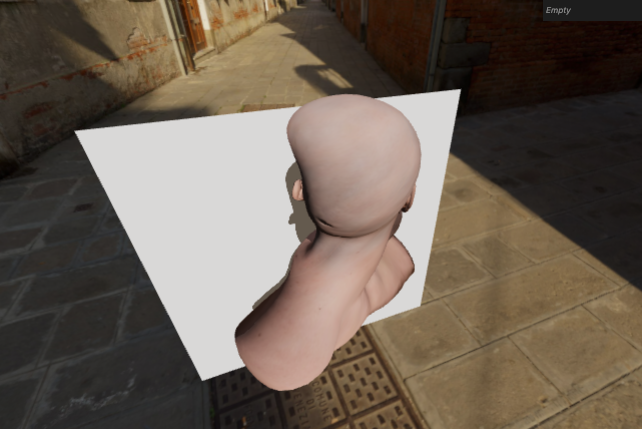
Three.js의 MeshStandardMaterial은 조명, 그림자, 텍스처, PBR(물리 기반 렌더링) 등을 내장한 강력한 재질입니다. 하지만 고유 셰이더를 완전히 새로 작성하지 않고도 이 재질에 사용자 정의 애니메이션을 적용할 수 있습니다. 이 문서에서는 Three.js의 onBeforeCompile 훅을 활용하여 머리 모델을 비틀어(twist) 애니메이션을 적용하는 방법을 단계별로 설명합니다.
⚖️ 셋업
- 모델: Lee Perry-Smith의 고해상도 얼굴 모델
- 재질: MeshStandardMaterial (map, normalMap 포함)
- 목표: 머리 메시에 비틀림(twist) 애니메이션을 적용하고, 그림자와 노멀도 일관성 있게 수정
const material = new THREE.MeshStandardMaterial({
  map: texture,
  normalMap: normalTexture,
});
🔨 onBeforeCompile 훅을 이용한 셰이더 수정
onBeforeCompile(shader)는 재질이 컴파일되기 전에 셰이더 코드에 접근할 수 있게 해주는 훅입니다.
material.onBeforeCompile = (shader) => {
  console.log(shader.vertexShader);
};
셰이더 내부에는 #include <begin_vertex>, #include <common>과 같은 chunk가 있으며, 이는 Three.js 내부 ShaderChunk 디렉터리에 정의되어 있습니다. 이 chunk들을 replace()하여 필요한 GLSL 코드를 삽입할 수 있습니다.
🌪️ Twist 효과 적용 (Vertex Shader)
1. 2D 회전 행렬 함수 정의
mat2 get2dRotateMatrix(float angle) {
  return mat2(cos(angle), -sin(angle), sin(angle), cos(angle));
}
2. common chunk에 회전 행렬 추가
shader.vertexShader = shader.vertexShader.replace(
  '#include <common>',
  `#include <common>
   uniform float uTime;
   mat2 get2dRotateMatrix(float angle) {
     return mat2(cos(angle), -sin(angle), sin(angle), cos(angle));
   }`,
);
3. begin_vertex chunk에 twist 적용
shader.vertexShader = shader.vertexShader.replace(
  '#include <begin_vertex>',
  `#include <begin_vertex>
   float angle = (position.y + uTime) * 0.9;
   mat2 rotateMatrix = get2dRotateMatrix(angle);
   transformed.xz = rotateMatrix * transformed.xz;`,
);
🕐 시간 애니메이션 적용 (uniform 전달)
const customUniforms = {
  uTime: { value: 0 },
};

material.onBeforeCompile = (shader) => {
  shader.uniforms.uTime = customUniforms.uTime;
  // ... 위 셰이더 수정 코드 포함
};

const clock = new THREE.Clock();
function tick() {
  customUniforms.uTime.value = clock.getElapsedTime();
  // renderer.render(...)
}
☁️ 그림자 반영을 위한 customDepthMaterial 설정
Three.js는 그림자 렌더링 시 MeshDepthMaterial을 사용합니다. 이 재질도 동일하게 비틀어야 합니다.
const depthMaterial = new THREE.MeshDepthMaterial({
  depthPacking: THREE.RGBADepthPacking
})

depthMaterial.onBeforeCompile = (shader) => {
  shader.uniforms.uTime = customUniforms.uTime;
  shader.vertexShader = shader.vertexShader.replace(... 동일하게 twist 적용)
}

mesh.customDepthMaterial = depthMaterial;
⚡️ 노멀도 회전시켜서 조명 버그 수정
objectNormal을 twist 시키기 위해 beginnormal_vertex를 수정합니다.
1. beginnormal_vertex 수정
shader.vertexShader = shader.vertexShader.replace(
  '#include <beginnormal_vertex>',
  `#include <beginnormal_vertex>
   float angle = (position.y + uTime) * 0.9;
   mat2 rotateMatrix = get2dRotateMatrix(angle);
   objectNormal.xz = rotateMatrix * objectNormal.xz;`,
);
2. 중복 선언 방지 위해 begin_vertex에서는 rotateMatrix 재사용
shader.vertexShader = shader.vertexShader.replace(
  '#include <begin_vertex>',
  `#include <begin_vertex>
   transformed.xz = rotateMatrix * transformed.xz;`,
);
🚀 응용
- angle = sin(position.y + uTime) * 0.4 와 같이 더욱 다양한 패턴 적용 가능
- uTime을 GUI 컨트롤러와 연동하여 사용자 조작 지원 가능
- get2dRotateMatrix를 다른 변환으로 바꾸면 확장 가능
관련 GLSL 함수 설명
| cos(x) / sin(x) | x 라디안 값에 대한 삼각 함수 계산 |
| mat2(...) | 2x2 행렬 생성 |
| transform.xz = mat2 * vec2 | 2D 회전 적용 |
| objectNormal | 버텍스 노멀 값, 조명 계산에 사용 |
🌟 결론
Three.js의 MeshStandardMaterial을 직접 재작성하지 않고도 onBeforeCompile을 통해 커스터마이징된 셰이더 애니메이션을 적용할 수 있습니다. 이 방식은 Three.js의 모든 PBR 기능을 유지하면서도 GLSL 수준의 유연함을 제공합니다.
Tip: depthMaterial, beginnormal_vertex, begin_vertex는 그림자, 조명, 위치 등에 핵심적으로 작용하는 부분이므로 chunk 명을 정확히 파악하여 변경해야 합니다.
import * as THREE from 'three';
import { OrbitControls } from 'three/examples/jsm/controls/OrbitControls.js';
import { GLTFLoader } from 'three/examples/jsm/loaders/GLTFLoader.js';
import GUI from 'lil-gui';

/**
 * Debug GUI
 */
const gui = new GUI();

/**
 * Canvas & Scene
 */
const canvas = document.querySelector('canvas.webgl');
const scene = new THREE.Scene();

/**
 * Loaders
 */
const textureLoader = new THREE.TextureLoader();
const gltfLoader = new GLTFLoader();
const cubeTextureLoader = new THREE.CubeTextureLoader();

/**
 * 환경 맵 설정 - 씬의 배경 및 조명 환경 반사에 사용
 */
const environmentMap = cubeTextureLoader.load([
  '/textures/environmentMaps/0/px.jpg',
  '/textures/environmentMaps/0/nx.jpg',
  '/textures/environmentMaps/0/py.jpg',
  '/textures/environmentMaps/0/ny.jpg',
  '/textures/environmentMaps/0/pz.jpg',
  '/textures/environmentMaps/0/nz.jpg',
]);
scene.background = environmentMap;
scene.environment = environmentMap;

/**
 * 텍스처 로드 - 색상 및 노멀 맵
 */
const mapTexture = textureLoader.load('/models/LeePerrySmith/color.jpg');
mapTexture.colorSpace = THREE.SRGBColorSpace;
const normalTexture = textureLoader.load('/models/LeePerrySmith/normal.jpg');

/**
 * 커스텀 uniform 정의
 */
const customUniforms = {
  uTime: { value: 0 }, // 시간에 따라 회전 변형을 적용할 때 사용
};

/**
 * 기본 재질 (쉐이더 확장 예정)
 */
const material = new THREE.MeshStandardMaterial({
  map: mapTexture,
  normalMap: normalTexture,
});

/**
 * 깊이 전용 재질 (섀도우 계산에 사용) + 커스텀 쉐이더 적용
 */
const depthMaterial = new THREE.MeshDepthMaterial({
  depthPacking: THREE.RGBADepthPacking,
});

/**
 * 모든 재질에 환경광 반응 및 그림자 설정 적용
 */
const updateAllMaterials = () => {
  scene.traverse((child) => {
    if (
      child instanceof THREE.Mesh &&
      child.material instanceof THREE.MeshStandardMaterial
    ) {
      child.material.envMapIntensity = 1;
      child.material.needsUpdate = true;
      child.castShadow = true;
      child.receiveShadow = true;
    }
  });
};

/**
 * 재질에 커스텀 셰이더 삽입 (회전 변형 추가)
 */
material.onBeforeCompile = (shader) => {
  shader.uniforms.uTime = customUniforms.uTime;

  // 회전 행렬 함수 추가
  shader.vertexShader = shader.vertexShader.replace(
    '#include <common>',
    `#include <common>
     uniform float uTime;
     mat2 get2dRotateMatrix(float _angle) {
       return mat2(cos(_angle), -sin(_angle), sin(_angle), cos(_angle));
     }`,
  );

  // 노멀 회전
  shader.vertexShader = shader.vertexShader.replace(
    '#include <beginnormal_vertex>',
    `#include <beginnormal_vertex>
     float angle = (position.y + uTime) * 0.5;
     mat2 rotateMatrix = get2dRotateMatrix(angle);
     objectNormal.xz = rotateMatrix * objectNormal.xz;`,
  );

  // 위치 회전
  shader.vertexShader = shader.vertexShader.replace(
    '#include <begin_vertex>',
    `#include <begin_vertex>
     transformed.xz = rotateMatrix * transformed.xz;`,
  );
};

/**
 * 그림자용 depth material에도 동일한 쉐이더 삽입
 */
depthMaterial.onBeforeCompile = (shader) => {
  shader.uniforms.uTime = customUniforms.uTime;
  shader.vertexShader = shader.vertexShader.replace(
    '#include <common>',
    `#include <common>
     uniform float uTime;
     mat2 get2dRotateMatrix(float _angle) {
       return mat2(cos(_angle), -sin(_angle), sin(_angle), cos(_angle));
     }`,
  );
  shader.vertexShader = shader.vertexShader.replace(
    '#include <begin_vertex>',
    `#include <begin_vertex>
     float angle = (position.y + uTime) * 0.5;
     mat2 rotateMatrix = get2dRotateMatrix(angle);
     transformed.xz = rotateMatrix * transformed.xz;`,
  );
};

/**
 * 모델 로딩 및 장면에 추가
 */
gltfLoader.load('/models/LeePerrySmith/LeePerrySmith.glb', (gltf) => {
  const mesh = gltf.scene.children[0];
  mesh.rotation.y = Math.PI * 0.5;
  mesh.material = material; // 커스텀 쉐이더 적용
  mesh.customDepthMaterial = depthMaterial; // 그림자에도 동일한 쉐이더 사용
  scene.add(mesh);

  updateAllMaterials();
});

/**
 * 바닥 Plane
 */
const plane = new THREE.Mesh(
  new THREE.PlaneGeometry(15, 15),
  new THREE.MeshStandardMaterial(),
);
plane.rotation.y = Math.PI;
plane.position.set(0, -5, 5);
scene.add(plane);

/**
 * 조명
 */
const directionalLight = new THREE.DirectionalLight('#ffffff', 3);
directionalLight.castShadow = true;
directionalLight.shadow.mapSize.set(1024, 1024);
directionalLight.shadow.camera.far = 15;
directionalLight.shadow.normalBias = 0.05;
directionalLight.position.set(0.25, 2, -2.25);
scene.add(directionalLight);

/**
 * 창 크기 변화 대응
 */
const sizes = {
  width: window.innerWidth,
  height: window.innerHeight,
};
window.addEventListener('resize', () => {
  sizes.width = window.innerWidth;
  sizes.height = window.innerHeight;
  camera.aspect = sizes.width / sizes.height;
  camera.updateProjectionMatrix();
  renderer.setSize(sizes.width, sizes.height);
  renderer.setPixelRatio(Math.min(window.devicePixelRatio, 2));
});

/**
 * 카메라 및 컨트롤
 */
const camera = new THREE.PerspectiveCamera(
  75,
  sizes.width / sizes.height,
  0.1,
  100,
);
camera.position.set(4, 1, -4);
scene.add(camera);

const controls = new OrbitControls(camera, canvas);
controls.enableDamping = true;

/**
 * 렌더러 설정
 */
const renderer = new THREE.WebGLRenderer({ canvas, antialias: true });
renderer.shadowMap.enabled = true;
renderer.shadowMap.type = THREE.PCFShadowMap;
renderer.toneMapping = THREE.ACESFilmicToneMapping;
renderer.toneMappingExposure = 1;
renderer.setSize(sizes.width, sizes.height);
renderer.setPixelRatio(Math.min(window.devicePixelRatio, 2));

/**
 * 애니메이션 루프
 */
const clock = new THREE.Clock();
const tick = () => {
  const elapsedTime = clock.getElapsedTime();
  customUniforms.uTime.value = elapsedTime;
  controls.update();
  renderer.render(scene, camera);
  window.requestAnimationFrame(tick);
};

tick();'Graphic > ThreeJS' 카테고리의 다른 글
| 46 퍼포먼스 최적화 (6) | 2025.08.06 |
|---|---|
| 45 후처리(Post-Processing) (5) | 2025.08.06 |
| 30 Animated galaxy (5) | 2025.08.05 |
| 29 Animated Water Shader (2) | 2025.08.04 |
| 28 Shader patterns (4) | 2025.08.04 |


