
R3F 환경(Background · Lights · Shadows · Sky · Environment · Stage)
1. 개요
- 기본 씬(구/큐브/바닥)에서 시작해 배경색, 라이트/헬퍼, 여러 그림자 방식, 하늘(Sky), Environment Map(HDRI/프리셋/커스텀), Stage(원샷 세팅) 를 다룹니다.
- 성능 확인용으로 <Perf />(r3f-perf), 카메라 제어는 <OrbitControls /> 사용을 전제합니다.
2. 배경 색(Background) 바꾸는 4가지
2-1) CSS로 페이지 배경 지정
/* 설계 의도: Canvas는 기본 투명 → 페이지 배경으로 색 지정 */
html,
body,
#root {
  position: fixed;
  top: 0;
  left: 0;
  width: 100%;
  height: 100%;
  background: red; /* (type: CSS color) */
}
2-2) WebGLRenderer.setClearColor
// 설계 의도: 캔버스 클리어 색을 렌더러 단계에서 지정(오브젝트 렌더 전)
const onCreated = ({ gl }) => {
  gl.setClearColor('#ff0000', 1); // (color:string|number, alpha:number)
};

<Canvas onCreated={onCreated}>{/* ... */}</Canvas>;
2-3) scene.background = Color
// 설계 의도: 씬 배경을 three.js Color로 지정
import * as THREE from 'three';

const onCreated = ({ scene }) => {
  scene.background = new THREE.Color('ivory'); // (type: THREE.Color)
};
2-4) R3F <color attach="background" /> (권장, 선언형)
// 설계 의도: JSX로 배경을 선언적으로 부착(attach="background" → scene.background)
<Canvas>
  <color args={['ivory']} attach="background" /> {/* (args:[colorLike]) */}
  <Experience />
</Canvas>
3. 라이트 & Light Helper
// 설계 의도: 라이트를 선언형으로 추가하고, useHelper로 Three의 Helper를 연결
import * as THREE from 'three';
import { useRef } from 'react';
import { useHelper } from '@react-three/drei';

export default function Experience() {
  const dir = useRef(); // (type: RefObject<THREE.DirectionalLight>)

  useHelper(dir, THREE.DirectionalLightHelper, 1); // (ref, HelperCtor, size:number)

  return (
    <>
      <directionalLight
        ref={dir}
        position={[1, 2, 3]} // (type:[x,y,z])
        intensity={4.5} // (type:number)
      />
      <ambientLight intensity={1.5} />
      {/* ... */}
    </>
  );
}
4. 그림자(Shadows)
4-1) 기본 그림자 활성화
// 설계 의도: 렌더러에서 그림자 사용, 라이트/메시에서 cast/receive 지정
<Canvas shadows camera={{ fov:45, near:0.1, far:200, position:[-4,3,6] }}>
  <Experience/>
</Canvas>

<directionalLight castShadow /* ... */ />
<mesh castShadow /* caster */>...</mesh>
<mesh receiveShadow /* receiver */>...</mesh>
(옵션) Shadow 맵 세부 조정
<directionalLight
  castShadow
  shadow-mapSize={[1024, 1024]} // (type:[w,h]) 해상도
  shadow-camera-near={1} // (type:number)
  shadow-camera-far={10}
  shadow-camera-top={5}
  shadow-camera-right={5}
  shadow-camera-bottom={-5}
  shadow-camera-left={-5}
/>
4-2) BakeShadows — 한 번만 렌더(정적일 때)
// 설계 의도: 프레임마다 계산 비용 절약(정적 씬에 적합)
import { BakeShadows } from '@react-three/drei';

<>
  <BakeShadows /> {/* (no props) */}
  {/* ... */}
</>;
4-3) SoftShadows — PCSS 기반 부드러운 그림자
// 설계 의도: Shader chunk를 패치하여 소프트 섀도우 구현(변경 시 셰이더 재컴파일 → 성능 주의)
import { SoftShadows } from '@react-three/drei';

<>
  {/* <BakeShadows />는 끄고 움직임 관찰 */}
  <SoftShadows size={25} samples={10} focus={0} />
</>;
4-4) AccumulativeShadows + RandomizedLight
// 설계 의도: 여러 프레임에 걸쳐 다양한 각도의 라이트로 그림자를 누적해 리얼한 소프트 효과를 만듦
import { AccumulativeShadows, RandomizedLight } from '@react-three/drei';

<AccumulativeShadows
  position={[0, -0.99, 0]} // (type:[x,y,z]) 바닥 바로 위
  scale={10} // (type:number) 그림자 평면 범위
  color="#316d39" // (type:string) 그림자 색 틴트
  opacity={0.8} // (type:number) 불투명도
  frames={100} // (type:number|Infinity) 누적 프레임 수
  temporal // (type:boolean) 프레임 분산(첫 프레임 프리즈 방지)
  blend={100} // (type:number) 최근 N프레임 블렌딩(움직임 매끄럽게)
>
  <RandomizedLight
    position={[1, 2, 3]} // 라이트 중심
    amount={8} // (type:number) 여러 개의 난수 라이트
    radius={1} // (type:number) 흩뿌리는 반경
    ambient={0.5} // (type:number) 전역광 유사 효과
    intensity={3} // (type:number) 광량
    bias={0.001} // (type:number) 섀도우 acne 보정
  />
</AccumulativeShadows>;
<RandomizedLight>에는 조명의 동작을 제어하는 여러 가지 속성이 있습니다.
- amount: 조명의 개수(기본적으로 여러 개의 조명이 있음)
- radius: 흔들림의 진폭
- intensity: 조명의 강도
- ambient: 마치 글로벌 조명이 전체 장면을 비추는 것처럼 작동하여 좁은 공간과 틈새에만 그림자가 생깁니다.
shadowMap과 관련된 매개변수:
- castShadow: 그림자가 드리워져야 한다면
- bias: 객체가 스스로 그림자를 드리우거나 객체 표면에 매우 가까운 객체에 그림자를 드리우지 않는 문제를 해결하기 위한 바이어스 오프셋
- mapSize: 섀도우 맵 크기(작을수록 성능이 좋아짐)
- size: 그림자의 진폭 ( top, right, bottom그리고 left모두 동시에)
- near그리고 far: 그림자 맵 카메라가 객체를 얼마나 가까이, 얼마나 멀리 렌더링할 것인가
팁: frames={Infinity}면 움직임 대응도 가능하지만 blend를 적절히(예: 100) 주지 않으면 깜빡임이 느껴질 수 있어요.
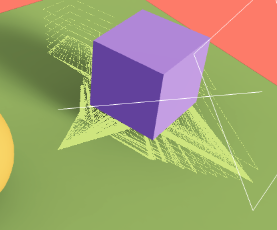
팁: helper 가 있으면 위 사진과 같은 현상이 발생합니다.
4-5) ContactShadows — 가벼운 접지(컨택트) 그림자
// 설계 의도: 라이트 없이 “바닥 카메라”로 씬을 렌더 → 블러 처리한 접지 그림자
import { ContactShadows } from '@react-three/drei';

<Canvas shadows={false}>{/* 기본 그림자 시스템 비활성화 */}</Canvas>

<ContactShadows
  position={[0, -0.99, 0]} // (type:[x,y,z]) 바닥 바로 위로 살짝 띄우기(z-fighting 방지)
  scale={10}               // (type:number)
  resolution={512}         // (type:number) 품질
  far={5}                  // (type:number) 그림자 영향 높이
  color="#1d8f75"          // (type:string)
  opacity={0.4}            // (type:number)
  blur={2.8}               // (type:number)
  // frames={1}            // (type:number) 1로 베이크(한 번만 계산)
 />
5. Sky — 물리 기반 하늘(태양 위치만 사용 예)
// 설계 의도: 리얼한 하늘 배경과 간접광 느낌 제공(주로 sunPosition만 조정)
import { Sky } from '@react-three/drei';
import { useControls } from 'leva';

const { sunPosition } = useControls('sky', {
  sunPosition: { value: [1, 2, 3] }, // (type:[x,y,z])
});

<>
  <Sky sunPosition={sunPosition} />
  <directionalLight position={sunPosition} intensity={4.5} castShadow />
</>;- <Sky>는 태양 위치에 따라 하늘 그라디언트·색감·밝기 등을 계산. (Light와는 무관)
- directionalLight가 광원의 역할을 함.
6. Environment Map — 큐브/HD(RI)/프리셋/커스텀
6-1) 큐브 텍스처 6장
import { Environment } from '@react-three/drei';

<Environment
  files={[
    './environmentMaps/2/px.jpg',
    './environmentMaps/2/nx.jpg',
    './environmentMaps/2/py.jpg',
    './environmentMaps/2/ny.jpg',
    './environmentMaps/2/pz.jpg',
    './environmentMaps/2/nz.jpg',
  ]}
/>;
6-2) HDRI 1장
<Environment background files="./environmentMaps/the_sky_is_on_fire_2k.hdr" />
6-3) 프리셋(Poly Haven 경유)
<Environment background preset="sunset" /> {/* (type:'sunset'|... 리스트 참조) */}
export const presetsObj = {
apartment: 'lebombo_1k.hdr',
city: 'potsdamer_platz_1k.hdr',
dawn: 'kiara_1_dawn_1k.hdr',
forest: 'forest_slope_1k.hdr',
lobby: 'st_fagans_interior_1k.hdr',
night: 'dikhololo_night_1k.hdr',
park: 'rooitou_park_1k.hdr',
studio: 'studio_small_03_1k.hdr',
sunset: 'venice_sunset_1k.hdr',
warehouse: 'empty_warehouse_01_1k.hdr',
}
6-4) 커스텀 환경(메시/라이트포머 삽입)
import { Lightformer, Environment } from '@react-three/drei';

<Environment background /* 또는 ground={...} */>
  <color args={['#000']} attach="background" /> {/* env 씬의 배경색 */}
  {/* 강한 컬러 라이트: Lightformer 권장 */}
  <Lightformer
    position-z={-5} // (type:number) 축별 단일 prop
    scale={5} // (type:number)
    color="red" // (type:string)
    intensity={10} // (type:number) 밝기
    form="ring" // (type:'rect'|'ring'|'circle')
  />
</Environment>;
6-5) 환경 Ground 프로젝션(바닥 감)
// 설계 의도: background 대신 ground로 투영해 “바닥이 가까이 있는” 듯한 느낌
const { envMapIntensity, envMapHeight, envMapRadius, envMapScale } =
  useControls('environment map', {
    envMapIntensity: { value: 7, min: 0, max: 12 },
    envMapHeight: { value: 7, min: 0, max: 100 },
    envMapRadius: { value: 28, min: 10, max: 1000 },
    envMapScale: { value: 100, min: 10, max: 1000 },
  });

<Environment
  preset="sunset"
  ground={{
    height: envMapHeight, // (type:number)
    radius: envMapRadius, // (type:number)
    scale: envMapScale, // (type:number)
  }}
/>;
팁: envMap은 조명/반사에 쓰일 뿐, 해상도가 낮아도(예: resolution={32}) 라이팅 용도로는 충분할 때가 많습니다.
7. Stage — “좋은 기본값” 원샷 세팅
// 설계 의도: 환경 맵 + 그림자(Contact/Accumulative 선택) + 양쪽 디렉셔널 라이트 + 센터링을 한 번에
import { Stage } from '@react-three/drei';

<Stage
  shadows={{ type: 'contact', opacity: 0.2, blur: 3 }} // (type:'contact'|'accumulative' + 옵션)
  environment="sunset" // (type: string preset)
  preset="portrait" // (type:'rembrandt'|'portrait'|'upfront'|'soft')
  intensity={7} // (type:number) env + 라이트 강도 통합 제어
>
  {/* 여기에 모델/메시 배치 */}
  <mesh position-y={1} position-x={-2}>
    <sphereGeometry />
    <meshStandardMaterial color="orange" />
  </mesh>
  <mesh position-y={1} position-x={2} scale={1.5}>
    <boxGeometry />
    <meshStandardMaterial color="mediumpurple" />
  </mesh>
</Stage>;
8. 성능 팁 & 흔한 함정
- 그림자 해상도(shadow-mapSize)는 성능에 직접적. 필요한 라이트에만 castShadow.
- SoftShadows는 속성 변경 시 셰이더 재컴파일 → 슬라이더로 막 바꾸지 말고 값을 찾은 뒤 고정.
- AccumulativeShadows frames=Infinity는 동적 장면에 유리하나 비용 큼. blend로 스무딩.
- ContactShadows는 프레임마다 렌더/블러 → frames={1}로 베이크 가능(정적일 때).
- Environment는 라이팅만 필요하면 낮은 resolution로도 충분.
- Perf(r3f-perf)로 draw call/프레임타임을 확인하며 조정.
9. 치트시트
// 배경(선언형)
<color args={['ivory']} attach="background" />

// 기본 그림자
<Canvas shadows />
<directionalLight castShadow />
<mesh castShadow /><mesh receiveShadow />

// 부드러운 그림자
<SoftShadows size={25} samples={10} focus={0} />

// 누적 그림자 + 난수 라이트
<AccumulativeShadows frames={100} temporal>
  <RandomizedLight amount={8} radius={1} intensity={3} />
</AccumulativeShadows>

// 접지 그림자(경량)
<ContactShadows position={[0,-0.99,0]} scale={10} resolution={512} blur={3} />

// 하늘 & 태양 위치 공유
<Sky sunPosition={sun} />
<directionalLight position={sun} castShadow />

// 환경맵(프리셋/HD)
<Environment background preset="sunset" />
<Environment background files="./env.hdr" />

// 라이트포머(강한 색광)
<Environment><Lightformer intensity={10} color="red" /></Environment>

// Ground 프로젝션
<Environment ground={{height:7,radius:28,scale:100}} />

// Stage(원샷)
<Stage shadows={{type:'contact',opacity:0.2,blur:3}} environment="sunset" preset="portrait" />
// index.jsx
import './style.css';
import ReactDOM from 'react-dom/client';
import { Canvas } from '@react-three/fiber';
import Experience from './Experience.jsx';
import * as THREE from 'three';

const root = ReactDOM.createRoot(document.querySelector('#root'));

// 0) css background color 설정

// onCreated 내부 state.gl
// const created = ({ gl, scene }) => {
// 1) WebGLRenderer 설정
// gl.setClearColor('#ff0000', 1); // 최초 1회 색상 설정 color , alpha
// 2) Scene.background으로 색상 설정
// scene.background = new THREE.Color('red');
// };

root.render(
  <Canvas
    // frameloop="demand" // 정적 프레임으로 설정
    shadows={false} // 그림자 활성화 == renderer.shadowMap.enabled = true;
    camera={{
      fov: 45,
      near: 0.1,
      far: 200,
      position: [-4, 3, 6],
    }}
    // onCreated={created} // 최초 실행 시 한번 실행
  >
    {/* 3) attach로 scene background 추가 */}
    {/* <color args={['#ff0000']} attach="background" /> */}
    <Experience />
  </Canvas>,
);
// Experience.jsx
import { useFrame, useThree } from '@react-three/fiber';
import {
Stage,
Lightformer,
Environment,
Sky,
ContactShadows,
AccumulativeShadows,
RandomizedLight,
SoftShadows,
BakeShadows,
useHelper,
OrbitControls,
} from '@react-three/drei';
import { useEffect, useRef } from 'react';
import { Perf } from 'r3f-perf';
import * as THREE from 'three';
import { useControls } from 'leva';
export default function Experience() {
/**
* (선택) 정적 프레임 환경에서 "원하는 시점에만" 렌더하고 싶을 때 사용
* - frameloop="demand" 모드에서 invalidate()를 호출하면 그 프레임만 렌더됨
* - 아래 코드는 "60fps로 제한하여 일정 간격으로 invalidate"하는 예시
*/
// const { invalidate } = useThree();
// useEffect(() => {
// const interval = setInterval(() => {
// invalidate(); // 역할: 한 프레임만 강제 렌더
// }, 1000 / 60); // 역할: 60fps에 맞춰 호출
// return () => clearInterval(interval);
// }, [invalidate]);
/**
* DirectionalLight Helper 설정
* - useHelper(ref, HelperClass, size)
* @param ref: React.RefObject<THREE.DirectionalLight>
* @param HelperClass: typeof THREE.DirectionalLightHelper
* @param size: number (helper size)
* - 역할: DirectionalLight의 방향/범위를 시각화
*/
const directionalLightRef = useRef();
useHelper(directionalLightRef, THREE.DirectionalLightHelper, 1);
/**
* 회전할 큐브 레퍼런스
* - ref 타입: React.RefObject<THREE.Mesh>
*/
const cube = useRef();
/**
* 애니메이션 루프
* - useFrame((state, delta) => { ... })
* @param state: RootState (clock, scene, camera 등 포함)
* @param delta: number (초 단위 프레임 간격)
* - 역할: 매 프레임 큐브를 천천히 회전
*/
useFrame((state, delta) => {
// const time = state.clock.elapsedTime; // 시간 기반 이동 예시
// cube.current.position.x = 2 + Math.sin(time);
if (cube.current) cube.current.rotation.y += delta * 0.2;
});
/**
* ContactShadows(바닥 접촉 그림자)용 Leva 패널
* - color: 그림자 색
* - opacity: 불투명도 [0~1]
* - blur: 블러 강도
*/
const { color, opacity, blur } = useControls('contact shadows', {
color: '#000000',
opacity: { value: 0.5, min: 0, max: 1 },
blur: { value: 1, min: 0, max: 10 },
});
/**
* Sky(하늘 셰이더)용 태양 위치
* - sunPosition: [x,y,z]
* - Sky는 "배경 셰이더"만 담당 (Light는 생성하지 않음)
* - 일관성 있는 라이팅을 위해 DirectionalLight 위치와 동일하게 쓰는 것이 일반적
*/
const { sunPosition } = useControls('sky', {
sunPosition: { value: [1, 2, 3] }, // 타입: [number, number, number]
});
/**
* Environment(IBL) 설정값
* - envMapIntensity: PBR 재질의 environment 영향 강도(전역 느낌, 재질별 envMapIntensity도 별도 있음)
* - ground: 아래쪽 hemisphere ground-projection(환경 반사에서 땅의 간섭 정도)
* - height/radius/scale: ground-projection 영역 제어
*/
const { envMapIntensity, envMapHeight, envMapRadius, envMapScale } =
useControls('environment map', {
envMapIntensity: { value: 7, min: 0, max: 12 },
envMapHeight: { value: 7, min: 0, max: 100 },
envMapRadius: { value: 28, min: 10, max: 1000 },
envMapScale: { value: 100, min: 10, max: 1000 },
});
/**
* (참고) scene.environmentIntensity 같은 전역 커스텀 필드에 값을 전달하고 싶을 때
* - three 기본값은 scene.environment(텍스처) 하나뿐이며,
* intensity는 재질(material.envMapIntensity) 또는 톤매핑 노출(renderer.toneMappingExposure)로 조절
*/
// const scene = useThree((state) => state.scene);
// useEffect(() => {
// // 커스텀으로 scene에 필드를 달아 쓰고 싶을 경우 (three 표준 API는 아님)
// // scene.environmentIntensity = envMapIntensity as any;
// }, [envMapIntensity, scene]);
return (
<>
{/**
* Environment: IBL(간접광) + 선택적으로 background(스카이박스) 설정
* - background: boolean → scene.background에도 환경을 적용
* - files: 경로 문자열(HDR equirect 또는 cubemap 배열) / preset: 미리 정의된 HDRI
* - children을 넣으면 "가상 씬"을 큐브맵으로 캡처해 environment로 사용
*
* 아래는 다양한 모드 예시. 필요 시 주석 해제하여 실험:
*/}
{/* <Environment
background
// Cubemap 6장 텍스처 예시 (px/nx/py/ny/pz/nz)
// files={[
// './environmentMaps/2/px.jpg',
// './environmentMaps/2/nx.jpg',
// './environmentMaps/2/py.jpg',
// './environmentMaps/2/ny.jpg',
// './environmentMaps/2/pz.jpg',
// './environmentMaps/2/nz.jpg',
// ]}
// Equirect HDR 예시
// files="./environmentMaps/the_sky_is_on_fire_2k.hdr"
// preset: 'sunset' | 'city' | 'warehouse' 등 편의 프리셋
preset="sunset"
// resolution={1024} // PMREM 해상도(품질/성능 트레이드오프)
ground={{
// 역할: ground-projection. 바닥면이 있는 실내 반사 느낌 등 연출 가능
// 타입: { height: number; radius: number; scale: number }
height: envMapHeight,
radius: envMapRadius,
scale: envMapScale,
}}
>
{/** 가상 씬의 background를 검정으로 지정 (환경맵 생성 시 반영) */}
{/* <color args={['#000000']} attach="background" /> */}
{/**
* Lightformer: 스튜디오 조명 패널/링을 손쉽게 배치하기 위한 전용 컴포넌트
* - color/intensity/scale/position 등으로 IBL 기여를 직관적으로 제어
* - mesh + MeshBasicMaterial로 패널을 만드는 것보다 밝기 스케일 감이 좋음
*/}
{/* <Lightformer
position-z={-5} // 타입: number (변환 축 단축 표기, Z축 -5)
scale={5} // 타입: number | [x,y] | [x,y,z]
color="red" // 타입: THREE.ColorRepresentation
intensity={10} // 타입: number (상대 밝기)
form="ring" // 타입: 'rect' | 'ring' | 'circle'
/> */}
{/**
* (대안) 일반 mesh를 이용한 발광 패널
* - MeshBasicMaterial은 조명 무시 → 환경 캡처 시 "발광면"처럼 동작
* - color를 [>1,>1,>1]처럼 HDR 톤으로 올리면 IBL 기여가 커짐
*/}
{/* <mesh position-z={-5} scale={10}>
<planeGeometry />
<meshBasicMaterial color={[2, 0, 0]} />
</mesh> */}
{/* </Environment> */}
{/**
* BakeShadows: 초기 1회 그림자를 베이크하여 이후 프레임에서 재활용
* - 동적인 조명/오브젝트가 많지 않을 때 성능 이점
*/}
{/* <BakeShadows /> */}
{/**
* SoftShadows: PCSS 기반의 부드러운 그림자
* - size: 커널/샘플 영역 크기
* - samples: 샘플 수(품질↑ 비용↑)
* - focus: 그림자 초점(선명-부드러움 균형)
*/}
{/* <SoftShadows size={25} samples={10} focus={0} /> */}
{/** 배경 색을 단색으로 강제할 때 사용 */}
{/* <color args={['salmon']} attach="background" /> */}
{/** 성능 패널: FPS/프레임 타임/메모리 등 모니터링 */}
<Perf position="top-left" />
{/**
* OrbitControls:
* - makeDefault: 이 컨트롤을 씬의 기본 컨트롤로 등록
* - 마우스 드래그로 카메라 회전/줌/이동
*/}
<OrbitControls makeDefault />
{/**
* AccumulativeShadows: 여러 프레임을 누적하여 고품질 접촉 그림자 생성
* - frames: 누적 프레임 수(무한대면 매우 부드러우나 초기 로딩/성능 주의)
* - temporal: 시간 축으로 누적(애니메이션 시 부드럽게)
* - blend: 최근 프레임 비중(너무 크면 성능 저하)
* - RandomizedLight: 무작위 방향광 샘플링으로 부드러운 그림자 분포
*/}
{/* <AccumulativeShadows
position={[0, -0.99, 0]} // 바닥면에 거의 붙여서 z-fighting 회피
scale={10}
color="#316d39"
opacity={0.8}
frames={1} // 너무 크면 초기 성능 저하(iOS 등 재로딩 이슈 주의)
// frames={Infinity}
temporal
blend={100}
>
<RandomizedLight
amount={8} // 광원 샘플 수
radius={1} // 샘플 분포 반경
ambient={0.5} // 주변광 성분
intensity={3} // 광원 세기
position={[1, 2, 3]}
bias={0.001} // 섀도우 acne 방지
/>
</AccumulativeShadows> */}
{/**
* ContactShadows: 바닥 접촉 그림자(스크린스페이스 기반)
* - resolution: 해상도(품질/성능 트레이드오프)
* - far: 그림자 투영 거리
*/}
{/* <ContactShadows
position={[0, -0.99, 0]}
scale={10}
resolution={512}
far={5}
color={color}
opacity={opacity}
blur={blur}
/> */}
{/**
* 직접광(Directional) + 앰비언트 라이트
* - Sky의 sunPosition과 동일한 위치를 사용하면 시각적 일관성 ↑
* - shadow 카메라 범위를 오브젝트에 맞게 좁혀서 그림자 해상도 ↑
*/}
{/* <directionalLight
ref={directionalLightRef}
position={sunPosition} // 타입: [number, number, number]
intensity={4.5}
castShadow
shadow-mapSize={[1024, 1024]} // mapSize.set(1024, 1024)와 동일
shadow-camera-near={1}
shadow-camera-far={10}
shadow-camera-top={5}
shadow-camera-right={5}
shadow-camera-bottom={-5}
shadow-camera-left={-5}
/>
<ambientLight intensity={1.5} /> */}
{/**
* Sky: Shader 기반 하늘 배경(IBL 아님)
* - Light를 생성하지 않음 → 실제 조명은 별도의 Light가 담당
*/}
{/* <Sky sunPosition={sunPosition} /> */}
{/**
* 기본 오브젝트들(스피어/큐브/바닥)
* - castShadow/receiveShadow는 Shadow 패스 사용 시에만 의미 있음
*/}
{/* <mesh castShadow position-x={-2}>
<sphereGeometry />
<meshStandardMaterial color="orange" />
</mesh>
<mesh castShadow ref={cube} position-x={2} scale={1.5}>
<boxGeometry />
<meshStandardMaterial color="mediumpurple" />
</mesh>
<mesh
receiveShadow
position-y={-1}
rotation-x={-Math.PI * 0.5}
scale={10}
>
<planeGeometry />
<meshStandardMaterial color="greenyellow" />
</mesh> */}
{/**
* Stage: 쉬운 라이팅/배경/섀도우 프리셋 제공
* - shadows: { type: 'contact' | 'accumulative', opacity, blur } 등
* - environment: string preset (예: 'sunset', 'city' ...)
* - preset: 카메라/조명 구도 프리셋 (예: 'portrait', 'rembrandt', 'soft')
* - intensity: 환경광(IBL) 강도 → PBR 재질에 적용되는 전역적인 간접광 효과
*
* 주의: Stage 내부에 넣은 mesh는 Stage가 제공하는 환경/라이트를 사용.
* 상단의 Environment/Light와 중복 적용되면 결과가 섞일 수 있음.
*/}
<Stage
shadows={{ type: 'contact', opacity: 0.2, blur: 3 }} // 타입: { type: 'contact' | 'accumulative'; opacity?: number; blur?: number }
environment="sunset" // 타입: string(프리셋명)
preset="portrait" // 타입: 'portrait' | 'rembrandt' | 'soft' 등
intensity={envMapIntensity} // 타입: number (IBL 강도)
>
<mesh position-y={1} position-x={-2}>
<sphereGeometry />
<meshStandardMaterial color="orange" />
</mesh>
<mesh ref={cube} position-y={1} position-x={2} scale={1.5}>
<boxGeometry />
<meshStandardMaterial color="mediumpurple" />
</mesh>
</Stage>
</>
);
}'Graphic > R3F' 카테고리의 다른 글
| 60 3D Text (6) | 2025.08.18 |
|---|---|
| 59 Load models(GLTF 모델 로딩과 애니메이션) (2) | 2025.08.18 |
| 정적 렌더링을 통해 원하는 시기에만 frame 갱신하기 (frameloop="demand") (7) | 2025.08.16 |
| 57 R3F Debug (7) | 2025.08.15 |
| 56 Drei (2) | 2025.08.15 |


