
GLTF 모델 로딩과 애니메이션
1. 기본 환경 구성
export default function Experience() {
  return (
    <>
      {/* 성능 모니터링 UI */}
      <Perf position="top-left" />

      {/* 카메라 이동 가능 */}
      <OrbitControls makeDefault />

      {/* 광원 설정 */}
      <directionalLight castShadow position={[1, 2, 3]} intensity={4.5} />
      <ambientLight intensity={1.5} />

      {/* 그림자 받는 바닥 */}
      <mesh
        receiveShadow
        position-y={-1}
        rotation-x={-Math.PI * 0.5}
        scale={10}>
        <planeGeometry />
        <meshStandardMaterial color="greenyellow" />
      </mesh>
    </>
  );
}
- <Perf />: FPS 및 렌더링 상태 체크.
- <OrbitControls />: 마우스로 카메라 이동 가능.
- castShadow, receiveShadow: 그림자 활성화.
2. GLTF 모델 로딩 (useLoader)
import { useLoader } from '@react-three/fiber';
import { GLTFLoader } from 'three/examples/jsm/loaders/GLTFLoader.js';

export default function Experience() {
  const model = useLoader(GLTFLoader, './hamburger.glb');
  return <primitive object={model.scene} scale={0.35} />;
}
- useLoader(LoaderClass, path): Three.js Loader를 R3F에서 쉽게 사용.
- <primitive object={...} />: R3F에서 직접 Three.js 오브젝트를 붙일 때 사용.
- scale={0.35}: 전체 크기 조정.
아래 처럼도 사용 가능(primitive로 붙이지 말고 R3F 매핑 방식으로 분해해서 사용하는 게 더 권장):
import { useGLTF } from '@react-three/drei';

const { nodes, materials } = useGLTF('/hamburger.glb')

return (
  <mesh geometry={nodes.Burger.geometry} material={materials.Bun} />
)
3. DRACO 압축 모델 로딩
import { DRACOLoader } from 'three/examples/jsm/loaders/DRACOLoader.js';

const model = useLoader(GLTFLoader, './hamburger-draco.glb', (loader) => {
  const dracoLoader = new DRACOLoader();
  dracoLoader.setDecoderPath('./draco/');
  loader.setDRACOLoader(dracoLoader);
});
- DRACOLoader: 압축된 glTF(.glb) 모델 해제.
- setDecoderPath(): /public/draco/ 경로 지정 필요.
4. Lazy Loading (지연 로딩)
React의 <Suspense>와 별도 컴포넌트로 구현.
// Model.jsx
import { useLoader } from '@react-three/fiber';
import { GLTFLoader } from 'three/examples/jsm/loaders/GLTFLoader.js';
import { DRACOLoader } from 'three/examples/jsm/loaders/DRACOLoader.js';

export default function Model() {
  const model = useLoader(
    GLTFLoader,
    './FlightHelmet/glTF/FlightHelmet.gltf',
    (loader) => {
      const dracoLoader = new DRACOLoader();
      dracoLoader.setDecoderPath('./draco/');
      loader.setDRACOLoader(dracoLoader);
    },
  );
  return <primitive object={model.scene} scale={5} position-y={-1} />;
}
// Experience.jsx
import { Suspense } from 'react';
import Model from './Model.jsx';
import Placeholder from './Placeholder.jsx';

<Suspense fallback={<Placeholder position-y={0.5} scale={[2, 3, 2]} />}>
  <Model />
</Suspense>;
- <Suspense>: 모델이 로드될 때까지 대기.
- fallback: 로딩 중 보여줄 대체 컴포넌트.
5. drei의 useGLTF
import { useGLTF } from '@react-three/drei';

export default function Model() {
  const model = useGLTF('./hamburger.glb');
  return <primitive object={model.scene} scale={0.35} />;
}
- useGLTF: DRACO 지원 포함, 가장 편리한 방법.
- useGLTF.preload(path): 미리 모델 로딩 → 캐싱.
6. 여러 개 복제 (Clone)
import { Clone, useGLTF } from '@react-three/drei';

export default function Model() {
  const model = useGLTF('./hamburger.glb');
  return (
    <>
      <Clone object={model.scene} scale={0.35} position-x={-4} />
      <Clone object={model.scene} scale={0.35} position-x={0} />
      <Clone object={model.scene} scale={0.35} position-x={4} />
    </>
  );
}
- Clone: 하나의 geometry/material을 공유하는 복제.
- 성능 효율적 (draw call 최소화).
7. GLTF → 컴포넌트 변환
gltf.pmnd.rs 에서 변환하면, 각 파트를 JSX <mesh>로 분리한 코드 생성.
GLTF –> React Three Fiber
gltf.pmnd.rs

코드를 그대로 복사하는 것보다 오브젝트를 원하는 대로 맞추고 'copy to clopboard'로 복사하는 게 좋은 방법이다.
// Hamburger.jsx
import { useGLTF } from '@react-three/drei';

export default function Hamburger(props) {
  const { nodes, materials } = useGLTF('./hamburger.glb');
  return (
    <group {...props} dispose={null}>
      <mesh
        castShadow
        receiveShadow
        geometry={nodes.bottomBun.geometry}
        material={materials.BunMaterial}
      />
      <mesh
        castShadow
        receiveShadow
        geometry={nodes.meat.geometry}
        material={materials.SteakMaterial}
        position={[0, 2.82, 0]}
      />
      <mesh
        castShadow
        receiveShadow
        geometry={nodes.cheese.geometry}
        material={materials.CheeseMaterial}
        position={[0, 3.04, 0]}
      />
      <mesh
        castShadow
        receiveShadow
        geometry={nodes.topBun.geometry}
        material={materials.BunMaterial}
        position={[0, 1.77, 0]}
      />
    </group>
  );
}
- 각 부분을 별도 <mesh>로 조작 가능.
- dispose={null}: 메모리 자동 해제 방지.
8. 그림자 최적화
<directionalLight
  castShadow
  position={[1, 2, 3]}
  intensity={4.5}
  shadow-normalBias={0.04}
/>
- shadow-normalBias: shadow acne(그림자 줄무늬 현상) 해결.
9. 애니메이션 (useAnimations)
// Fox.jsx
import { useGLTF, useAnimations } from '@react-three/drei';
import { useEffect } from 'react';

export default function Fox() {
  const fox = useGLTF('./Fox/glTF/Fox.gltf');
  const { actions } = useAnimations(fox.animations, fox.scene);

  useEffect(() => {
    actions.Run.play();
  }, []);

  return (
    <primitive
      object={fox.scene}
      scale={0.02}
      position={[-2.5, 0, 2.5]}
      rotation-y={0.3}
    />
  );
}
- useAnimations(animations, root): glTF 내 포함된 애니메이션 바인딩.
- actions.Run.play(): 특정 애니메이션 실행.
- fadeIn, fadeOut, reset → 부드러운 크로스페이드 지원.
Leva와 연동 (애니메이션 선택 UI)
import { useControls } from 'leva';

const { animationName } = useControls({
  animationName: { options: animations.names },
});

useEffect(() => {
  const action = actions[animationName];
  action.reset().fadeIn(0.5).play();
  return () => action.fadeOut(0.5);
}, [animationName]);
- Leva로 드롭다운 제공 → 실시간 애니메이션 전환.
- cleanup(return ...): 이전 애니메이션 fadeOut.
📌 핵심 요약
- 모델 로딩: useLoader → useGLTF (권장).
- DRACO 압축: DRACOLoader → drei의 useGLTF가 자동 처리.
- Lazy Loading: <Suspense> + fallback + 분리 컴포넌트.
- 복제: <Clone> → 성능 효율적 다중 인스턴스.
- GLTF → 컴포넌트 변환: gltfjsx 툴로 자동 변환 후 직접 파트 제어 가능.
- 애니메이션: useAnimations + fadeIn/fadeOut/reset으로 자연스러운 전환.
- Leva 연동: UI 기반 실시간 애니메이션 제어.
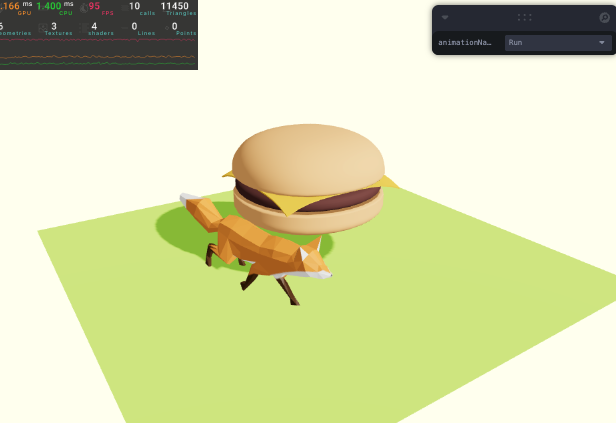
// Experience
import { OrbitControls } from '@react-three/drei';
import { Perf } from 'r3f-perf';
import { Suspense } from 'react';
import Model from './Model';
import PlaceHolder from './Placeholder';
import Hamburger from './Hamburger';
import Fox from './Fox';

export default function Experience() {
  return (
    <>
      {/* Perf */}
      <Perf position="top-left" />

      {/* Controls */}
      <OrbitControls makeDefault />

      {/* Light */}
      <directionalLight
        castShadow
        position={[1, 2, 3]}
        intensity={4.5}
        shadow-normalBias={0.5} // 조명에 의한 그림자 조정 (햄버거 표면에 shadow acne 제거를 위한)
      />
      <ambientLight intensity={1.5} />

      {/* floor */}
      <mesh
        receiveShadow
        position-y={-1}
        rotation-x={-Math.PI * 0.5}
        scale={10}>
        <planeGeometry />
        <meshStandardMaterial color="greenyellow" />
      </mesh>

      {/* Load model */}
      <Suspense fallback={<PlaceHolder position-y={0.5} scale={[2, 3, 2]} />}>
        <Hamburger scale={0.35} />
      </Suspense>

      <Fox />
    </>
  );
}
// PlaceHolder
export default function PlaceHolder(props) {
return (
<mesh {...props}>
<boxGeometry args={[1, 1, 1, 2, 2, 2]} />
<meshBasicMaterial wireframe color="red" />
</mesh>
);
}// Model
import { Clone, useGLTF } from '@react-three/drei';
import Hamburger from './Hamburger';
// import { useLoader } from '@react-three/fiber';
// import { GLTFLoader } from 'three/examples/jsm/loaders/GLTFLoader';
// import { DRACOLoader } from 'three/examples/jsm/loaders/DRACOLoader.js';
export default function Model() {
// .glb load
// const model = useLoader(GLTFLoader, './hamburger.glb');
// draco load
// const model = useLoader(GLTFLoader, './hamburger-draco.glb', (loader) => {
// const dracoLoader = new DRACOLoader();
// dracoLoader.setDecoderPath('./draco/');
// loader.setDRACOLoader(dracoLoader);
// });
// const model = useLoader(
// GLTFLoader,
// './FlightHelmet/glTF/FlightHelmet.gltf',
// (loader) => {
// const dracoLoader = new DRACOLoader();
// dracoLoader.setDecoderPath('./draco/');
// loader.setDRACOLoader(dracoLoader);
// },
// );
// useGLTF 이용하기 (public/draco 없이 draco도 가능 )
const model = useGLTF('./hamburger-draco.glb');
return (
<>
{/* primitive로 씬에 추가하기 */}
{/* <primitive // 예약어이므로 변경할 수 없음.
object={model.scene}
scale={0.35}
/> */}
{/* Clone으로 여러 오브젝트 생성 */}
<Clone object={model.scene} scale={0.35} position-x={-4} />
<Clone object={model.scene} scale={0.35} position-x={0} />
<Clone object={model.scene} scale={0.35} position-x={4} />
</>
);
}
// 먼저 로딩하기
useGLTF.preload('./hamburger-draco.glb');// Hamburger
/*
Auto-generated by: https://github.com/pmndrs/gltfjsx
*/
import React, { useRef } from 'react';
import { useGLTF } from '@react-three/drei';
export default function Hamburger(props) {
const { nodes, materials } = useGLTF('./hamburger.glb');
return (
<group {...props} dispose={null}>
<mesh
castShadow
receiveShadow
geometry={nodes.bottomBun.geometry}
material={materials.BunMaterial}
/>
<mesh
castShadow
receiveShadow
geometry={nodes.meat.geometry}
material={materials.SteakMaterial}
position={[0, 2.817, 0]}
/>
<mesh
castShadow
receiveShadow
geometry={nodes.cheese.geometry}
material={materials.CheeseMaterial}
position={[0, 3.04, 0]}
/>
<mesh
castShadow
receiveShadow
geometry={nodes.topBun.geometry}
material={materials.BunMaterial}
position={[0, 1.771, 0]}
/>
</group>
);
}
useGLTF.preload('./hamburger.glb');// Fox
// https://github.com/KhronosGroup/glTF-Sample-Models/tree/main/2.0/Fox
import { useAnimations, useGLTF } from '@react-three/drei';
import { useEffect } from 'react';
import { useControls } from 'leva';
export default function Fox() {
const fox = useGLTF('./Fox/glTF/Fox.gltf');
const animations = useAnimations(fox.animations, fox.scene);
const { animationName } = useControls({
animationName: { options: animations.names },
});
useEffect(() => {
const action = animations.actions[animationName];
action.reset().fadeIn(0.5).play();
// animations.actions.Run.play();
// window.setTimeout(() => {
// animations.actions.Walk.play();
// animations.actions.Walk.crossFadeFrom(animations.actions.Run, 1);
// }, 2000);
// clean up
return () => {
action.fadeOut(0.5);
};
}, [animationName]);
return (
<primitive
object={fox.scene}
scale={0.02}
position={[-2.5, 0, 2.5]}
rotation-y={0.3}
/>
);
}'Graphic > R3F' 카테고리의 다른 글
| 61 Portal Scene (0) | 2025.08.18 |
|---|---|
| 60 3D Text (6) | 2025.08.18 |
| 58 R3F Environment and Staging (5) | 2025.08.16 |
| 정적 렌더링을 통해 원하는 시기에만 frame 갱신하기 (frameloop="demand") (7) | 2025.08.16 |
| 57 R3F Debug (7) | 2025.08.15 |


