
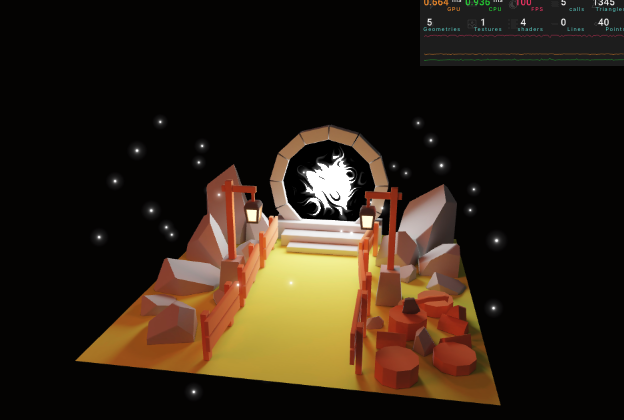
React Three Fiber – Portal Scene 재구현
1. Dark Background (어두운 배경)
<color args={['#030202']} attach="background" />
- <color>: 씬(Scene)의 특정 속성에 색상 적용 가능
- attach="background": 씬의 배경색을 지정
2. 모델 로딩 (useGLTF)
import { useGLTF } from '@react-three/drei';

const { nodes } = useGLTF('./model/portal.glb');
- nodes: Blender에서 Export한 각 파트의 이름별 geometry/transform 보관
- portal.glb 내부 구성
- nodes.baked → 메인 베이크 모델
- nodes.poleLightA, nodes.poleLightB → 기둥 조명
- nodes.portalLight → 포털
3. Baked 모델 + 텍스처
import { useTexture } from '@react-three/drei'

const bakedTexture = useTexture('./model/baked.jpg')
bakedTexture.flipY = false // Y축 반전 보정

<Center>
  <mesh geometry={nodes.baked.geometry}>
    <meshBasicMaterial map={bakedTexture} />
  </mesh>
</Center>
- useTexture: 텍스처 로더
- flipY = false: Blender/GLTF 좌표계 보정 필요
- <Center>: 전체 모델 중앙 정렬
4. Pole Lights (기둥 조명)
<mesh geometry={nodes.poleLightA.geometry} position={nodes.poleLightA.position}>
  <meshBasicMaterial color="#ffffe5" />
</mesh>
<mesh geometry={nodes.poleLightB.geometry} position={nodes.poleLightB.position}>
  <meshBasicMaterial color="#ffffe5" />
</mesh>
- Geometry + Position을 반드시 전달해야 Blender에서의 위치가 유지됨
5. Portal 본체 (초기 상태)
<mesh
  geometry={nodes.portalLight.geometry}
  position={nodes.portalLight.position}
  rotation={nodes.portalLight.rotation}>
  <meshBasicMaterial color="#ffffff" />
</mesh>
6. Tone Mapping 비활성화
<Canvas flat>
  <Experience />
</Canvas>
- flat: R3F 기본 toneMapping(ACESFilmic)을 비활성화 → THREE.NoToneMapping 적용
- 이유: Blender Bake 시 색상 보정이 이미 적용됨 → R3F toneMapping 중복 방지
7. Fireflies (반딧불 – Sparkles)
import { Sparkles } from '@react-three/drei';

<Sparkles
  size={6} // 파티클 크기
  scale={[4, 2, 4]} // 분포 영역
  position-y={1} // 높이
  speed={0.2} // 이동 속도
  count={40} // 입자 개수
/>;
- Drei의 Sparkles: Shader 작성 없이 바로 파티클 효과
8. Portal Shader (커스텀 셰이더 적용)
(1) 기본 <shaderMaterial>
<shaderMaterial
  vertexShader={portalVertexShader}
  fragmentShader={portalFragmentShader}
  uniforms={{
    uTime: { value: 0 },
    uColorStart: { value: new THREE.Color('#ffffff') },
    uColorEnd: { value: new THREE.Color('#000000') },
  }}
/>
(2) Drei의 shaderMaterial 헬퍼
import { shaderMaterial } from '@react-three/drei';
import { extend } from '@react-three/fiber';

const PortalMaterial = shaderMaterial(
  {
    uTime: 0,
    uColorStart: new THREE.Color('#ffffff'),
    uColorEnd: new THREE.Color('#000000'),
  },
  portalVertexShader,
  portalFragmentShader,
);

extend({ PortalMaterial });
이제 JSX에서 <portalMaterial /> 태그 사용 가능.
<mesh
  geometry={nodes.portalLight.geometry}
  position={nodes.portalLight.position}
  rotation={nodes.portalLight.rotation}>
  <portalMaterial ref={portalMaterial} />
</mesh>
9. 애니메이션 (uTime 업데이트)
const portalMaterial = useRef();

useFrame((_, delta) => {
  portalMaterial.current.uTime += delta;
});
- uTime: 프래그먼트 셰이더에서 애니메이션에 사용되는 시간 유니폼
- useFrame: 매 프레임마다 delta(프레임 시간) 만큼 증가
📌 최종 구조 요약
- 배경색 설정 → <color attach="background" />
- 모델 분리 로딩 → baked / pole lights / portal
- Baked 텍스처 → useTexture + flipY
- 조명 색상 → <meshBasicMaterial color />
- ToneMapping 제거 → <Canvas flat />
- 반딧불 → <Sparkles />
- Portal 셰이더 → shaderMaterial + extend → <portalMaterial />
- 애니메이션 → useFrame으로 uTime 업데이트
// index
import './style.css';
import ReactDOM from 'react-dom/client';
import { Canvas } from '@react-three/fiber';
import Experience from './Experience.jsx';

const root = ReactDOM.createRoot(document.querySelector('#root'));

root.render(
  <Canvas
    flat // == THREE.NoToneMapping
    camera={{
      fov: 45,
      near: 0.1,
      far: 200,
      position: [1, 2, 6],
    }}>
    <Experience />
  </Canvas>,
);
// fragment.glsl
// ---------------------------
// 🔹 Uniform 변수 (JS에서 넘겨주는 값들)
// ---------------------------
uniform float uTime; // 애니메이션 진행 시간 (초 단위) → 매 프레임 변화
uniform vec3 uColorStart; // 시작 색상 (vec3 = RGB)
uniform vec3 uColorEnd; // 끝 색상 (vec3 = RGB)
// ---------------------------
// 🔹 varying 변수 (Vertex Shader → Fragment Shader 전달값)
// ---------------------------
varying vec2 vUv; // 텍스처 좌표 (0~1 사이의 UV 좌표)
// ---------------------------
// 📌 Classic Perlin Noise (Stefan Gustavson)
// - 3D Perlin Noise를 계산하는 GLSL 함수
// - vec3 좌표를 넣으면 -1~1 범위의 노이즈 값 반환
// ---------------------------
// 해시 함수 (좌표 → 난수 인덱스 생성)
vec4 permute(vec4 x){ return mod(((x*34.0)+1.0)*x, 289.0); }
// Taylor inverse sqrt (성능 최적화를 위한 정규화 보정)
vec4 taylorInvSqrt(vec4 r){ return 1.79284291400159 - 0.85373472095314 * r; }
// Perlin Fade 함수 (곡선 보간)
vec3 fade(vec3 t) { return t*t*t*(t*(t*6.0-15.0)+10.0); }
// ---------------------------
// 🔹 cnoise (Classic Noise) 함수
// 입력: 3D 좌표 vec3(P)
// 출력: -1.0 ~ 1.0 사이의 Perlin Noise 값
// ---------------------------
float cnoise(vec3 P)
{
// 정수 좌표(격자 위치)와 소수 좌표(격자 내 보간 위치) 분리
vec3 Pi0 = floor(P);
vec3 Pi1 = Pi0 + vec3(1.0);
Pi0 = mod(Pi0, 289.0);
Pi1 = mod(Pi1, 289.0);
vec3 Pf0 = fract(P);
vec3 Pf1 = Pf0 - vec3(1.0);
// 격자 좌표를 이용한 해시 계산
vec4 ix = vec4(Pi0.x, Pi1.x, Pi0.x, Pi1.x);
vec4 iy = vec4(Pi0.yy, Pi1.yy);
vec4 iz0 = Pi0.zzzz;
vec4 iz1 = Pi1.zzzz;
vec4 ixy = permute(permute(ix) + iy);
vec4 ixy0 = permute(ixy + iz0);
vec4 ixy1 = permute(ixy + iz1);
// Gradient 벡터 생성
vec4 gx0 = ixy0 / 7.0;
vec4 gy0 = fract(floor(gx0) / 7.0) - 0.5;
gx0 = fract(gx0);
vec4 gz0 = vec4(0.5) - abs(gx0) - abs(gy0);
vec4 sz0 = step(gz0, vec4(0.0));
gx0 -= sz0 * (step(0.0, gx0) - 0.5);
gy0 -= sz0 * (step(0.0, gy0) - 0.5);
vec4 gx1 = ixy1 / 7.0;
vec4 gy1 = fract(floor(gx1) / 7.0) - 0.5;
gx1 = fract(gx1);
vec4 gz1 = vec4(0.5) - abs(gx1) - abs(gy1);
vec4 sz1 = step(gz1, vec4(0.0));
gx1 -= sz1 * (step(0.0, gx1) - 0.5);
gy1 -= sz1 * (step(0.0, gy1) - 0.5);
// 8개 코너 점에서의 gradient 벡터
vec3 g000 = vec3(gx0.x,gy0.x,gz0.x);
vec3 g100 = vec3(gx0.y,gy0.y,gz0.y);
vec3 g010 = vec3(gx0.z,gy0.z,gz0.z);
vec3 g110 = vec3(gx0.w,gy0.w,gz0.w);
vec3 g001 = vec3(gx1.x,gy1.x,gz1.x);
vec3 g101 = vec3(gx1.y,gy1.y,gz1.y);
vec3 g011 = vec3(gx1.z,gy1.z,gz1.z);
vec3 g111 = vec3(gx1.w,gy1.w,gz1.w);
// Gradient 정규화
vec4 norm0 = taylorInvSqrt(vec4(dot(g000, g000), dot(g010, g010), dot(g100, g100), dot(g110, g110)));
g000 *= norm0.x;
g010 *= norm0.y;
g100 *= norm0.z;
g110 *= norm0.w;
vec4 norm1 = taylorInvSqrt(vec4(dot(g001, g001), dot(g011, g011), dot(g101, g101), dot(g111, g111)));
g001 *= norm1.x;
g011 *= norm1.y;
g101 *= norm1.z;
g111 *= norm1.w;
// 각 코너 점에서의 기여값 (dot product)
float n000 = dot(g000, Pf0);
float n100 = dot(g100, vec3(Pf1.x, Pf0.yz));
float n010 = dot(g010, vec3(Pf0.x, Pf1.y, Pf0.z));
float n110 = dot(g110, vec3(Pf1.xy, Pf0.z));
float n001 = dot(g001, vec3(Pf0.xy, Pf1.z));
float n101 = dot(g101, vec3(Pf1.x, Pf0.y, Pf1.z));
float n011 = dot(g011, vec3(Pf0.x, Pf1.yz));
float n111 = dot(g111, Pf1);
// 보간 (Fade 함수로 부드럽게)
vec3 fade_xyz = fade(Pf0);
vec4 n_z = mix(vec4(n000, n100, n010, n110), vec4(n001, n101, n011, n111), fade_xyz.z);
vec2 n_yz = mix(n_z.xy, n_z.zw, fade_xyz.y);
float n_xyz = mix(n_yz.x, n_yz.y, fade_xyz.x);
return 2.2 * n_xyz; // 최종 노이즈 값 리턴
}
// ---------------------------
// 🔹 main() 함수: 실제 픽셀 색상 계산
// ---------------------------
void main()
{
// UV 좌표를 Perlin Noise로 변위시켜 흐르는 듯한 효과
vec2 displacedUv = vUv + cnoise(vec3(vUv * 5.0, uTime * 0.1));
// Noise 기반 강도(strength) 계산
float strength = cnoise(vec3(displacedUv * 5.0, uTime * 0.2));
// 외곽 Glow 효과 (중심에서 멀어질수록 값 증가)
float outerGlow = distance(vUv, vec2(0.5)) * 5.0 - 1.4;
strength += outerGlow;
// Step 함수로 특정 강도 이상일 때 급격히 밝아지도록
strength += step(-0.2, strength) * 0.8;
// 값 범위를 0~1로 제한 (주석 처리됨 → 더 강한 대비 연출 가능)
// strength = clamp(strength, 0.0, 1.0);
// 최종 색상: 시작색 ~ 끝색을 strength 값으로 보간
vec3 color = mix(uColorStart, uColorEnd, strength);
// 픽셀 색상 출력
gl_FragColor = vec4(color, 1.0);
}// vertex.glsl
varying vec2 vUv;
void main()
{
vec4 modelPosition = modelMatrix * vec4(position, 1.0);
vec4 viewPosition = viewMatrix * modelPosition;
vec4 projectionPosition = projectionMatrix * viewPosition;
gl_Position = projectionPosition;
vUv = uv;
}import {
Sparkles, // 반짝이는 입자 효과 컴포넌트 (drei 제공)
Center, // 3D 오브젝트를 가운데 정렬시켜주는 래퍼
useTexture, // 텍스처 로딩 훅
OrbitControls, // 카메라 조작 컨트롤러
useGLTF, // GLTF 모델 로딩 훅
shaderMaterial, // ShaderMaterial을 React 컴포넌트로 감싸주는 도우미
} from '@react-three/drei';
import * as THREE from 'three';
import { useRef } from 'react';
import portalVertexShader from './shaders/portal/vertex.glsl'; // 커스텀 Vertex Shader
import portalFragmentShader from './shaders/portal/fragment.glsl'; // 커스텀 Fragment Shader
import { extend, useFrame } from '@react-three/fiber';
import { Perf } from 'r3f-perf'; // 성능 모니터링 UI
// 🔹 커스텀 ShaderMaterial 정의
// shaderMaterial(uniforms, vertexShader, fragmentShader)
const PortalMaterial = shaderMaterial(
{
uTime: 0, // 시간 (애니메이션 진행에 사용)
uColorStart: new THREE.Color('#fff'), // 보간 시작 색상
uColorEnd: new THREE.Color('#000'), // 보간 끝 색상
},
portalVertexShader,
portalFragmentShader,
);
export default function Experience() {
// GLTF 모델 로드 (portal.glb)
const { nodes } = useGLTF('./model/portal.glb');
// ShaderMaterial 참조 (uniform 업데이트용)
const portalMaterialRef = useRef();
// 베이크된 텍스처 로드 (빛/그림자가 baked된 jpg)
const bakedTexture = useTexture('./model/baked.jpg');
// bakedTexture.flipY = false;
// → GLTF 모델 UV가 뒤집히지 않도록 설정
// (drei의 <meshBasicMaterial map-flipY={false}/>로 처리 가능)
// R3F에서 PortalMaterial을 사용할 수 있도록 확장
extend({ PortalMaterial });
// 매 프레임마다 실행 → uTime 업데이트 (애니메이션 효과)
useFrame((state, delta) => {
portalMaterialRef.current.uTime += delta;
});
return (
<>
{/* 성능 표시기 (FPS, draw calls 등) */}
<Perf />
{/* 배경색 */}
<color args={['#030202']} attach="background" />
{/* 카메라 컨트롤 */}
<OrbitControls makeDefault />
<Center>
{/* 🔹 baked 메쉬 (전체 구조물) */}
<mesh geometry={nodes.baked.geometry}>
<meshBasicMaterial map={bakedTexture} map-flipY={false} />
</mesh>
{/* 🔹 기둥에 달린 조명 (A) */}
<mesh
geometry={nodes.poleLightA.geometry}
position={nodes.poleLightA.position}
rotation={nodes.poleLightA.rotation}
scale={nodes.poleLightA.scale}>
<meshBasicMaterial color="#ffffe5" />
</mesh>
{/* 🔹 기둥에 달린 조명 (B) */}
<mesh
geometry={nodes.poleLightB.geometry}
position={nodes.poleLightB.position}
rotation={nodes.poleLightB.rotation}
scale={nodes.poleLightB.scale}>
<meshBasicMaterial color="#ffffe5" />
</mesh>
{/* 🔹 포털 빛나는 원형 부분 */}
<mesh
geometry={nodes.portalLight.geometry}
position={nodes.portalLight.position}
rotation={nodes.portalLight.rotation}
scale={nodes.portalLight.scale}>
{/* ① 기본 ShaderMaterial 직접 작성하는 방법 */}
{/*
<shaderMaterial
vertexShader={portalVertexShader}
fragmentShader={portalFragmentShader}
uniforms={{
uTime: { value: 0 },
uColorStart: { value: new THREE.Color('#fff') },
uColorEnd: { value: new THREE.Color('#000') },
}}
/>
*/}
{/* ② drei shaderMaterial로 만든 PortalMaterial 사용 */}
<portalMaterial ref={portalMaterialRef} />
</mesh>
{/* 🔹 Sparkles (포털 주변의 작은 반짝이는 파티클 효과) */}
<Sparkles
size={6} // 파티클 크기
scale={[4, 2, 4]} // 배치 범위
position-y={1} // Y축 위치
speed={0.2} // 반짝이는 속도
count={40} // 파티클 개수
/>
</Center>
</>
);
}'Graphic > R3F' 카테고리의 다른 글
| 63 후처리(Post Processing) (5) | 2025.08.18 |
|---|---|
| 62 Pointer Events (Mouse Events) (7) | 2025.08.18 |
| 60 3D Text (6) | 2025.08.18 |
| 59 Load models(GLTF 모델 로딩과 애니메이션) (2) | 2025.08.18 |
| 58 R3F Environment and Staging (5) | 2025.08.16 |


