
문제
There is a git repository at ssh://bandit28-git@bandit.labs.overthewire.org/home/bandit28-git/repo via the port 2220. The password for the user bandit28-git is the same as for the user bandit28.
Clone the repository and find the password for the next level.
## 내가 사용한 명령어
git clone ssh://bandit28-git@bandit.labs.overthewire.org:2220/home/bandit28-git/repo
cd repo
cat README.md

git log
git show
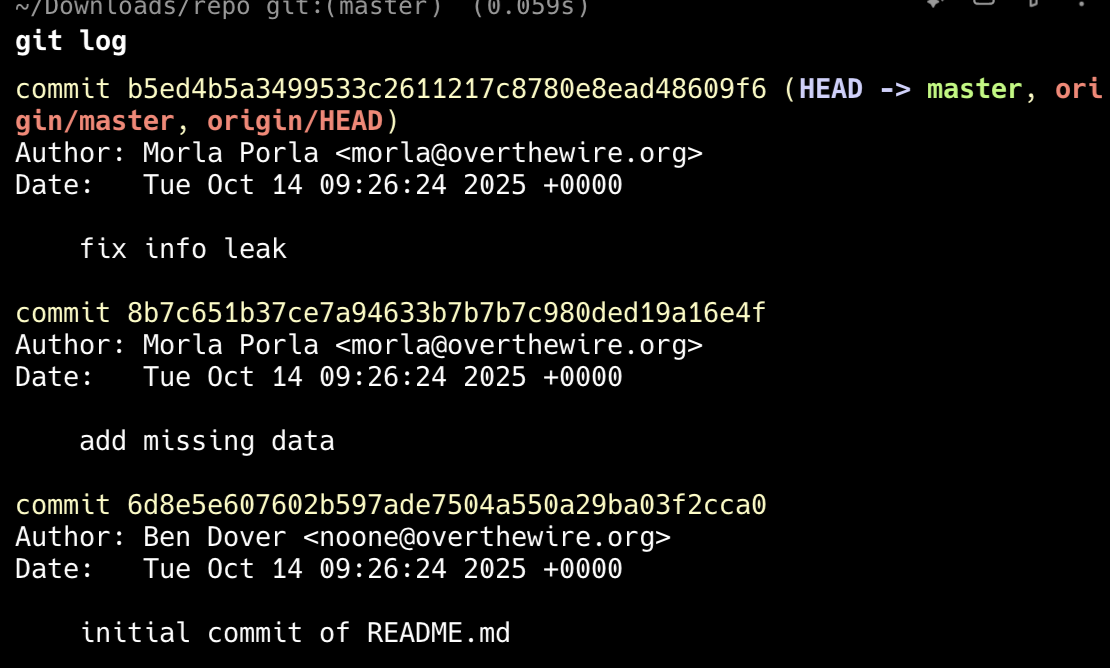

1. 특정 파일만 보기 (git log -- <file>)
예를 들어, 저장소에 README.md만 보고 싶다면:
git log -- README.md
=> README.md가 포함된 커밋만 나옴.
변경 내역까지 포함하고 싶은 경우
git log -p -- README.md
=> 파일의 수정 내용(diff)만 보여줌.
2. 커밋 내부에서 특정 파일만 보기 (git show <commit> -- <file>)
특정 커밋에서 전체 diff는 필요 없고 특정 파일만 보고 싶다면:
git show <커밋해시> -- README.md
예:
git show abc1234 -- password.txt
3. 특정 문자열만 검색 (git log -S <string>)
이건 정말 강력함.
-S는 “소스(search)”의 S로 이해하면 됨.
예:
git log -S "password"
=> “password”라는 문자열이 추가되거나 삭제된 커밋만 나타남.
비밀번호가 어느 커밋에서 추가됐는지 빠르게 찾을 수 있음.
4. 메시지 검색 (git log --grep "<pattern>")
커밋 메시지 안에 있는 내용을 찾고 싶다면:
git log --grep="secret"
정규식도 가능:
git log --grep="flag|password" --regexp-ignore-case
5. diff에서 특정 문자열 찾기 (git log -p | grep <pattern>)
만약 비밀번호가 diff 안에 박혀 있다면:
git log -p | grep -i password
이건 가장 직관적이고 빠르게 찾는 방법.
6. “파일 내용의 변화를 문자로 추적” (git blame <file>)
특정 파일의 현재 내용이 어디 커밋에서 추가된 건지 알고 싶으면:
git blame README.md
=> 각 줄이 어떤 커밋에서 만들어졌는지 표시.
7. 특정 파일 변경 요약만 보기 (git log --stat)
git log --stat
=> 어떤 파일이 얼마나 변경됐는지만 보여줌.
(Hint: Bandit에서는 종종 README 파일 하나만 수정된 커밋이 답이 될 때가 많음.)
8. “과거 특정 버전의 파일만 출력” (git show <commit>:<path>)
예를 들어 어떤 커밋에서 README 내용만 딱 확인하고 싶다면:
git show abc1234:README
=> diff가 아니라 파일 그 시점의 순수 내용만 출력됨.
Bandit에서 자주 쓰임.
9. 전체 검색 대신 HEAD에서 전체 파일 내용을 grep
git grep -n "password"
=> 현재 버전의 모든 파일에서 문자열 검색.
과거까지 보고 싶다면:
git grep -n "password" $(git rev-list --all)
=> 모든 커밋 전체를 grep해서 문자열 포함된 것만 표시. (이 방법은 매우 강력하지만 출력이 많을 수도 있음.)
'Security > OverTheWire' 카테고리의 다른 글
| Bandit Level 30 → Level 31 (git tag), Bandit Level 31 → Level 32 (0) | 2025.12.02 |
|---|---|
| Bandit Level 29 → Level 30 (git branch, checkout) (0) | 2025.12.02 |
| Bandit Level 26 → Level 27, Bandit Level 27 → Level 28 (0) | 2025.12.02 |
| Bandit Level 25 → Level 26 (more) (0) | 2025.12.02 |
| Bandit Level 24 → Level 25 (brute force) (0) | 2025.12.02 |


