21 모델 불러오기(Imported models)
Three.js에서 GLTF 모델 불러오기
1. 개요
Three.js에서는 기본적인 도형(primitive geometry)을 쉽게 생성할 수 있지만, 복잡한 형태의 3D 모델을 만들기에는 한계가 있습니다. 이럴 때는 외부의 3D 모델링 도구에서 만든 모델을 사용하는 것이 일반적입니다.
다양한 포맷 https://en.wikipedia.org/wiki/List_of_file_formats#3D_graphics
List of file formats - Wikipedia
From Wikipedia, the free encyclopedia Historical and current file formats This is a list of file formats used by computers, organized by type. Filename extension is usually noted in parentheses if they differ from the file format's name or abbreviation. Ma
en.wikipedia.org
이 수업에서는 외부에서 만들어진 GLTF 모델을 Three.js로 불러오고 렌더링하는 방법을 배웁니다.
2. 자주 쓰이는 3D 모델 포맷
많은 3D 포맷이 존재하며 각각의 포맷은 다음과 같은 목적을 충족하기 위해 만들어졌습니다:
- 포함하는 데이터의 종류 (예: 애니메이션, 재질, 조명 등)
- 용량, 압축률
- 호환성
- 저작권 및 라이선스
주요 포맷 예시
- .obj
- .fbx
- .stl
- .ply
- .dae (COLLADA)
- .3ds
- .gltf / .glb ← 추천 포맷
3. GLTF란?
GL Transmission Format (GLTF)는 Khronos Group(OpenGL, WebGL, Vulkan 등을 만든 곳)에서 만든 실시간용 3D 모델 포맷입니다.
특징:
- 다양한 데이터 포함 가능: geometry, material, animation, skeleton, morphing, light, camera 등
- 여러 타입 지원: JSON, binary, embedded texture
- WebGL 및 실시간 렌더링에 최적화
- 다양한 툴과 엔진에서 광범위하게 지원됨
4. GLTF의 4가지 주요 형식
GLTF는 다음과 같은 형식으로 구성될 수 있습니다:
- glTF (기본 형식)
- .gltf: JSON 형식의 메타데이터
- .bin: geometry, vertex, UV 등 binary 데이터
- .png 등 텍스처 파일 별도 존재
- glTF-Binary (.glb)
- 하나의 .glb 바이너리 파일에 모든 정보 포함
- 수정은 어려움
- glTF-Embedded
- 하나의 .gltf JSON 파일에 텍스처까지 Base64로 포함됨
- glTF-Draco
- geometry 데이터를 Google의 Draco 압축 알고리즘으로 압축 - 가벼움
내부 파일을 보면 PBR(Physically Based Rendering) Material을 지원하므로 MeshStandardMaterial을 사용해야한다.
5. Three.js에서 모델 불러오기
필수 임포트
// GLTF 로더 import
import { GLTFLoader } from 'three/examples/jsm/loaders/GLTFLoader.js';
모델 로더 초기화
// GLTF 로더 인스턴스 생성
const gltfLoader = new GLTFLoader();
기본 로드 방법
gltfLoader.load(
  '/models/Duck/glTF/Duck.gltf', // 로드할 GLTF 파일 경로
  (gltf) => {
    console.log('✅ Load 성공', gltf);
  },
  (progress) => {
    console.log('📦 로딩 중', progress);
  },
  (error) => {
    console.error('❌ 에러 발생', error);
  },
);
씬에 추가
gltfLoader.load('/models/Duck/glTF/Duck.gltf', (gltf) => {
  // 첫 번째 자식(Object3D)에 Mesh가 포함됨
  scene.add(gltf.scene.children[0]);
});
6. 모델 구조 분석 및 자식 요소 추가
FlightHelmet과 같이 여러 자식 요소를 가진 모델의 경우 다음과 같이 처리:
    // ❌ 잘못된 방식: 포함된 children이 1개 이상이면 로드되지 않음.
     scene.add(gltf.scene.children[0]);

    // ❌ 잘못된 방식: 반복 도중 배열이 변경되기 때문에 일부 child가 누락될 수 있음
     for (const child of gltf.scene.children) {
       scene.add(child);
     }

    // 가능한 방식: 배열을 복제한 후 반복하므로 원본 배열이 변경되지 않음
     const children = [...gltf.scene.children];
     for (const child of children) {
       scene.add(child);
     }

    // 안전한 방식: 배열이 줄어들 때까지 첫 번째 child를 하나씩 옮김
     while (gltf.scene.children.length) {
       scene.add(gltf.scene.children[0]);
     }

    // 추천 방식: 전체 씬을 추가
    scene.add(gltf.scene);
7. Draco 압축 모델 불러오기
많은 양의 glTF 파일을 사용하는 것이 아니면 코드 + draco glTF가 glTF보다 가볍다고 보기는 어렵습니다.
필요한 로더 import
import { DRACOLoader } from 'three/examples/jsm/loaders/DRACOLoader.js';
초기 설정
- 디코더는 네이티브 JavaScript뿐 아니라 웹 어셈블리(wasm)에서도 사용할 수 있으며, 워커(물리 수업 마지막에서 살펴본 또 다른 스레드)에서 실행할 수도 있습니다.
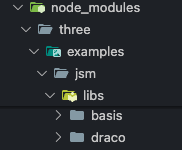
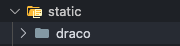
- Three.js 종속성을 탐색하여 Draco 디코더 폴더를 우리 /static/폴더에 복사해야 합니다.
- 종속성(three@0.174.0버전의 경우)은 'node-modules/three/examples/jsm/libs/draco' 폴더 전체를 'static/'으로 옮기면 됩니다.
- 이제 setDecoderPath('/draco/')로 접근시키면 됩니다.
const dracoLoader = new DRACOLoader();

// draco decoder 경로 설정 (static 폴더에 복사 필요)
dracoLoader.setDecoderPath('/draco/');

// GLTFLoader에 연결
gltfLoader.setDRACOLoader(dracoLoader);
이제 아래처럼 압축된 모델도 불러올 수 있습니다:
gltfLoader.load('/models/Duck/glTF-Draco/Duck.gltf', (gltf) => {
  scene.add(gltf.scene);
});
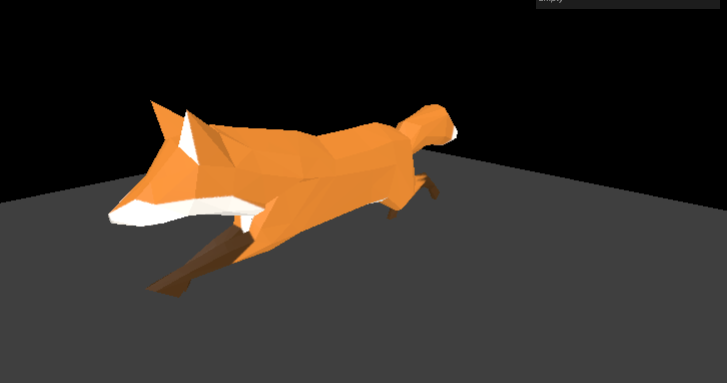
8. 애니메이션 포함 모델 사용 (Fox 예제)

// 내부에서 접근 (예제용, 사용 X)
gltfLoader.load('/models/Fox/glTF/Fox.gltf', (gltf) => {
  console.log(gltf);
  const mixer = new THREE.AnimationMixer(gltf.scene);
  const action = mixer.clipAction(gltf.animations[0]);

  gltf.scene.scale.set(0.025, 0.025, 0.025); // scale 조정
  scene.add(gltf.scene);
  action.play();
});
외부에서 접근
let mixer = null;

gltfLoader.load('/models/Fox/glTF/Fox.gltf', (gltf) => {
  gltf.scene.scale.set(0.03, 0.03, 0.03); // 너무 커서 스케일 조정
  scene.add(gltf.scene);

  // 애니메이션 믹서 생성
  mixer = new THREE.AnimationMixer(gltf.scene);

  // 첫 번째 애니메이션 적용
  const action = mixer.clipAction(gltf.animations[0]);
  action.play();
});
애니메이션 업데이트
const tick = () => {
  const deltaTime = clock.getDelta();

  // mixer가 설정되었을 때만 업데이트
  if (mixer) {
    mixer.update(deltaTime);
  }

  // 렌더링 및 컨트롤 업데이트
  renderer.render(scene, camera);
  requestAnimationFrame(tick);
};
9. Three.js 온라인 에디터
- 간단한 장면 테스트에 유용
- GLTF-Binary 또는 Embedded 형식 모델만 지원
- Add → Light로 광원 추가 후 모델 확인 가능
10. 결론
- GLTF는 실시간 환경에서 가장 이상적인 포맷입니다.
- 다양한 형태(glTF, glb, embedded, draco)를 상황에 따라 선택하세요.
- Draco는 용량 감소에 유리하지만 초기 렌더링 성능에 영향을 줄 수 있습니다.
- Three.js의 GLTFLoader는 다양한 형식을 쉽게 불러올 수 있도록 도와줍니다.
- 애니메이션, 조명, 씬 구조 등도 완전히 지원됩니다.
import * as THREE from 'three';
import { OrbitControls } from 'three/examples/jsm/controls/OrbitControls.js';
// import { GLTFLoader } from 'three/examples/jsm/loaders/GLTFLoader.js';
// import { DRACOLoader } from 'three/examples/jsm/loaders/DRACOLoader.js';

import { DRACOLoader, GLTFLoader } from 'three/examples/jsm/Addons.js';
import GUI from 'lil-gui';

/**
 * Base
 */
// Debug
const gui = new GUI();

// Canvas
const canvas = document.querySelector('canvas.webgl');

// Scene
const scene = new THREE.Scene();

/**
 * Models
 */
const gltfLoader = new GLTFLoader();
const dracoLoader = new DRACOLoader();
dracoLoader.setDecoderPath('/draco/'); // static에 있는 draco 폴더
gltfLoader.setDRACOLoader(dracoLoader); // gltf로더에 draco로더 연결

gltfLoader.load(
  '/models/FlightHelmet/glTF/FlightHelmet.gltf',
  (gltf) => {
    // ❌ 잘못된 방식: 포함된 children이 1개 이상이면 로드되지 않음.
    // scene.add(gltf.scene.children[0]);
    // ❌ 잘못된 방식: 반복 도중 배열이 변경되기 때문에 일부 child가 누락될 수 있음
    // for (const child of gltf.scene.children) {
    //   scene.add(child);
    // }
    // 가능한 방식: 배열을 복제한 후 반복하므로 원본 배열이 변경되지 않음
    // const children = [...gltf.scene.children];
    // for (const child of children) {
    //   scene.add(child);
    // }
    // 안전한 방식: 배열이 줄어들 때까지 첫 번째 child를 하나씩 옮김
    // while (gltf.scene.children.length) {
    //   scene.add(gltf.scene.children[0]);
    // }
    // 추천 방식: 전체 씬을 추가
    // scene.add(gltf.scene);
  },
  () => {
    console.log('progress');
  },
  () => {
    console.log('error');
  },
);

// gltfLoader.load('/models/Duck/glTF-Draco/Duck.gltf', (gltf) => {
//   scene.add(gltf.scene);
// });

let mixer = null;

gltfLoader.load('/models/Fox/glTF/Fox.gltf', (gltf) => {
  mixer = new THREE.AnimationMixer(gltf.scene);
  const action = mixer.clipAction(gltf.animations[2]);

  gltf.scene.scale.set(0.025, 0.025, 0.025); // scale 조정
  scene.add(gltf.scene);
  action.play();
});

/**
 * Floor
 */
const floor = new THREE.Mesh(
  new THREE.PlaneGeometry(10, 10),
  new THREE.MeshStandardMaterial({
    color: '#444444',
    metalness: 0,
    roughness: 0.5,
  }),
);
floor.receiveShadow = true;
floor.rotation.x = -Math.PI * 0.5;
scene.add(floor);

/**
 * Lights
 */
const ambientLight = new THREE.AmbientLight(0xffffff, 2.4);
scene.add(ambientLight);

const directionalLight = new THREE.DirectionalLight(0xffffff, 1.8);
directionalLight.castShadow = true;
directionalLight.shadow.mapSize.set(1024, 1024);
directionalLight.shadow.camera.far = 15;
directionalLight.shadow.camera.left = -7;
directionalLight.shadow.camera.top = 7;
directionalLight.shadow.camera.right = 7;
directionalLight.shadow.camera.bottom = -7;
directionalLight.position.set(5, 5, 5);
scene.add(directionalLight);

/**
 * Sizes
 */
const sizes = {
  width: window.innerWidth,
  height: window.innerHeight,
};

window.addEventListener('resize', () => {
  // Update sizes
  sizes.width = window.innerWidth;
  sizes.height = window.innerHeight;

  // Update camera
  camera.aspect = sizes.width / sizes.height;
  camera.updateProjectionMatrix();

  // Update renderer
  renderer.setSize(sizes.width, sizes.height);
  renderer.setPixelRatio(Math.min(window.devicePixelRatio, 2));
});

/**
 * Camera
 */
// Base camera
const camera = new THREE.PerspectiveCamera(
  75,
  sizes.width / sizes.height,
  0.1,
  100,
);
camera.position.set(2, 2, 2);
scene.add(camera);

// Controls
const controls = new OrbitControls(camera, canvas);
controls.target.set(0, 0.75, 0);
controls.enableDamping = true;

/**
 * Renderer
 */
const renderer = new THREE.WebGLRenderer({
  canvas: canvas,
});
renderer.shadowMap.enabled = true;
renderer.shadowMap.type = THREE.PCFSoftShadowMap;
renderer.setSize(sizes.width, sizes.height);
renderer.setPixelRatio(Math.min(window.devicePixelRatio, 2));

/**
 * Animate
 */
const clock = new THREE.Clock();
let previousTime = 0;

const tick = () => {
  const elapsedTime = clock.getElapsedTime();
  const deltaTime = elapsedTime - previousTime;
  previousTime = elapsedTime;

  // Update mixer
  if (mixer !== null) {
    // 초기 로딩 시 null이므로 null check 필수!
    mixer.update(deltaTime);
  }

  // Update controls
  controls.update();

  // Render
  renderer.render(scene, camera);

  // Call tick again on the next frame
  window.requestAnimationFrame(tick);
};

tick();