
Three.js 그림자 처리 가이드 (Shadow Rendering Guide)
소개
Three.js에서 그림자는 3D 공간의 사실감을 높여주는 중요한 요소입니다. 이 가이드에서는 그림자 유형부터 구현 방식, 최적화 방법까지 실용적인 코드와 함께 설명합니다.
1. 그림자의 유형
유형설명
| Core Shadow | 물체의 뒤쪽이 어둡게 표현되는 내부 그림자 |
| Drop Shadow | 한 물체가 다른 물체에 드리우는 외부 그림자 |
| Baked Shadow | 미리 렌더링된 그림자를 텍스처에 저장해 적용하는 방식 |
| Fake Shadow | 단순한 텍스처를 이용해 가짜 그림자처럼 보이게 하는 방식 |
2. 그림자 활성화
const renderer = new THREE.WebGLRenderer({ canvas: canvas });
renderer.shadowMap.enabled = true; // 전체 그림자 기능 활성화
3. 그림자 적용 설정
sphere.castShadow = true; // 이 객체는 그림자를 투사할 수 있음
plane.receiveShadow = true; // 이 객체는 그림자를 받을 수 있음
4. 그림자 지원 Light 유형
Light 종류 | 그림자 지원 | 설명
| PointLight | ✅ | 모든 방향으로 빛을 발사하는 점광원 |
| DirectionalLight | ✅ | 태양처럼 평행 광선을 생성 |
| SpotLight | ✅ | 원뿔 모양의 범위에 빛을 비추는 스포트라이트 |
const light = new THREE.DirectionalLight(0xffffff, 1.5);
light.castShadow = true;
5. 그림자 해상도 조정
light.shadow.mapSize.width = 1024; // 기본값은 512
light.shadow.mapSize.height = 1024; // 높일수록 품질 ↑, 성능 ↓
6. 그림자 카메라 설정 (Near, Far)
light.shadow.camera.near = 1; // 그림자 카메라 시작 거리
light.shadow.camera.far = 6; // 그림자 카메라 끝 거리
7. Orthographic 카메라 범위 설정 (DirectionalLight 전용)
light.shadow.camera.top = 2;
light.shadow.camera.right = 2;
light.shadow.camera.bottom = -2;
light.shadow.camera.left = -2;
// 좁을수록 그림자 품질↑, 너무 좁으면 그림자 잘림 발생
8. 그림자 흐림 효과 (Blur)
light.shadow.radius = 10; // 흐림 정도. PCFSoftShadowMap에서는 무시됨
9. Shadow Map 알고리즘 설정
renderer.shadowMap.type = THREE.PCFSoftShadowMap;
// 옵션: Basic, PCF, PCFSoft, VSM- THREE.BasicShadowMap은 가장 빠르고 가벼운 방식으로, 성능이 중요한 경우에 유리하지만 그림자 경계가 매우 거칠고 품질이 낮습니다.
- THREE.PCFShadowMap은 가장 일반적으로 사용되는 방식으로, 그림자 가장자리를 부드럽게 처리하지만 성능은 Basic보다는 떨어집니다.
- THREE.PCFSoftShadowMap은 PCF의 업그레이드 버전으로, 그림자 경계를 더 부드럽게 표현할 수 있지만 radius 값이 무시되며 렌더링 비용이 더 높습니다.
- THREE.VSMShadowMap은 Variance 기반으로 그림자 번짐이나 블러 효과를 만들 수 있으나, 세팅이 까다롭고 렌더링 이상 현상(아티팩트)이 발생할 수 있습니다.
- 일반적인 웹 프로젝트에서는 PCFSoftShadowMap이 품질과 성능의 균형이 가장 좋지만, 모바일이나 저성능 환경에서는 PCFShadowMap 또는 BasicShadowMap을 추천합니다.
10. SpotLight 그림자 설정
const spotLight = new THREE.SpotLight(0xffffff, 3.6, 10, Math.PI * 0.3);
spotLight.castShadow = true;
spotLight.shadow.mapSize.width = 1024;
spotLight.shadow.mapSize.height = 1024;
spotLight.shadow.camera.near = 1;
spotLight.shadow.camera.far = 6;
scene.add(spotLight, spotLight.target);
11. PointLight 그림자 설정
const pointLight = new THREE.PointLight(0xffffff, 2.7);
pointLight.castShadow = true;
pointLight.shadow.mapSize.width = 1024;
pointLight.shadow.mapSize.height = 1024;
pointLight.shadow.camera.near = 0.1;
pointLight.shadow.camera.far = 5;
scene.add(pointLight);
12. Baked Shadow (정적 그림자)
const textureLoader = new THREE.TextureLoader();
const bakedShadow = textureLoader.load('/textures/bakedShadow.jpg');
bakedShadow.colorSpace = THREE.SRGBColorSpace;

const plane = new THREE.Mesh(
  new THREE.PlaneGeometry(5, 5),
  new THREE.MeshBasicMaterial({ map: bakedShadow }), // 움직임 없음
);
13. Simple Fake Shadow (동적 가짜 그림자)
const simpleShadow = textureLoader.load('/textures/simpleShadow.jpg');

const sphereShadow = new THREE.Mesh(
  new THREE.PlaneGeometry(1.5, 1.5),
  new THREE.MeshBasicMaterial({
    color: 0x000000,
    transparent: true,
    alphaMap: simpleShadow,
  }),
);
sphereShadow.rotation.x = -Math.PI * 0.5;
sphereShadow.position.y = 0.01;
scene.add(sphereShadow);
그림자와 객체 동기화:
sphere.position.y = Math.abs(Math.sin(elapsedTime * 3));
sphereShadow.position.x = sphere.position.x;
sphereShadow.position.z = sphere.position.z;
sphereShadow.material.opacity = (1 - sphere.position.y) * 0.3;
🔍 참고
- ShadowMapViewer: threejs.org/examples/webgl_shadowmap_viewer.html
- 그림자 최적화는 성능과 품질 간의 균형이 핵심입니다.
- Spot/PointLight는 성능 비용이 크므로 꼭 필요한 경우에만 사용하세요.
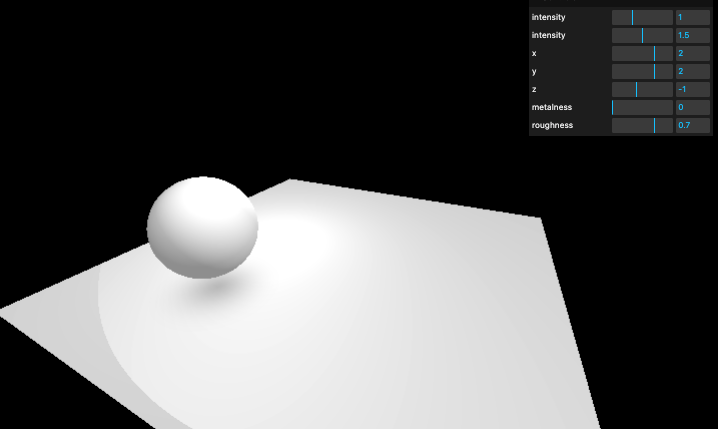
import * as THREE from 'three';
import { OrbitControls } from 'three/examples/jsm/controls/OrbitControls.js';
import GUI from 'lil-gui';

/**

Texture
*/
const textureLoader = new THREE.TextureLoader();
const bakedShadow = textureLoader.load('/textures/bakedShadow.jpg');
const simpleShadow = textureLoader.load('/textures/simpleShadow.jpg');
bakedShadow.colorSpace = THREE.SRGBColorSpace;
simpleShadow.colorSpace = THREE.SRGBColorSpace;

/**

Base
*/
// Debug
const gui = new GUI();

// Canvas
const canvas = document.querySelector('canvas.webgl');

// Scene
const scene = new THREE.Scene();

/**

Lights
*/
// Ambient light
const ambientLight = new THREE.AmbientLight(0xffffff, 1);
gui.add(ambientLight, 'intensity').min(0).max(3).step(0.001);
scene.add(ambientLight);

// Directional light (태양광과 비슷한 광원으로, 멀리서 평행하게 빛을 쏨)
const directionalLight = new THREE.DirectionalLight(0xffffff, 1.5);
directionalLight.position.set(2, 2, -1);
gui.add(directionalLight, 'intensity').min(0).max(3).step(0.001);
gui.add(directionalLight.position, 'x').min(-5).max(5).step(0.001);
gui.add(directionalLight.position, 'y').min(-5).max(5).step(0.001);
gui.add(directionalLight.position, 'z').min(-5).max(5).step(0.001);
scene.add(directionalLight);

// 그림자 생성 활성화
// DirectionalLight는 OrthographicCamera를 사용하여 그림자 맵을 생성함
// castShadow가 true면 이 광원이 그림자를 생성함
// receiveShadow는 해당 메시가 그림자를 받을 수 있게 함

// --- 그림자 설정 시작 ---
directionalLight.castShadow = true; // 이 광원이 그림자를 생성함

// 그림자 해상도 설정 (기본값은 512x512, 높일수록 부드러움)
directionalLight.shadow.mapSize.width = 1024;
directionalLight.shadow.mapSize.height = 1024;

// 그림자 카메라의 투영 크기 (값이 작을수록 그림자 품질 향상됨)
directionalLight.shadow.camera.top = 2;
directionalLight.shadow.camera.right = 2;
directionalLight.shadow.camera.bottom = -2;
directionalLight.shadow.camera.left = -2;

// 그림자 카메라의 near/far 범위 (조정이 잘못되면 그림자가 보이지 않거나 잘릴 수 있음)
directionalLight.shadow.camera.near = 1;
directionalLight.shadow.camera.far = 6;

// 그림자 경계 블러 효과 (PCFSoftShadowMap에서는 적용되지 않음)
directionalLight.shadow.radius = 10;

const directionalLightCameraHelper = new THREE.CameraHelper(
  directionalLight.shadow.camera,
);
directionalLightCameraHelper.visible = false;
scene.add(directionalLightCameraHelper);
// --- 그림자 설정 끝 ---

// SpotLight (원뿔 모양으로 빛을 쏘는 광원)
const spotLight = new THREE.SpotLight(0xffffff, 3.6, 10, Math.PI * 0.3);
spotLight.castShadow = true; // 그림자 생성 활성화
spotLight.shadow.mapSize.width = 1024;
spotLight.shadow.mapSize.height = 1024;
spotLight.shadow.camera.near = 1;
spotLight.shadow.camera.far = 6; // fov는 spotlight.angle에 의해 고정됨

spotLight.position.set(0, 2, 2);
scene.add(spotLight);
scene.add(spotLight.target);

const spotLightCameraHelper = new THREE.CameraHelper(spotLight.shadow.camera);
spotLightCameraHelper.visible = false;
scene.add(spotLightCameraHelper);

// PointLight (모든 방향으로 빛을 퍼뜨리는 광원)
const pointLight = new THREE.PointLight(0xffffff, 2.7);
pointLight.castShadow = true; // 그림자 생성 활성화
pointLight.shadow.mapSize.width = 1024;
pointLight.shadow.mapSize.height = 1024;
pointLight.shadow.camera.near = 0.1;
pointLight.shadow.camera.far = 5; // 큐브맵 형태로 그림자를 만듦 (성능에 영향 큼)

pointLight.position.set(-1, 1, 0);
scene.add(pointLight);

const pointLightCameraHelper = new THREE.CameraHelper(pointLight.shadow.camera);
pointLightCameraHelper.visible = false;
scene.add(pointLightCameraHelper);

/**

Materials
*/
const material = new THREE.MeshStandardMaterial();
material.roughness = 0.7;
gui.add(material, 'metalness').min(0).max(1).step(0.001);
gui.add(material, 'roughness').min(0).max(1).step(0.001);

/**

Objects
*/
const sphere = new THREE.Mesh(new THREE.SphereGeometry(0.5, 32, 32), material);
sphere.castShadow = true; // 이 메시가 그림자를 생성함

const plane = new THREE.Mesh(
  new THREE.PlaneGeometry(5, 5),
  // new THREE.MeshBasicMaterial({ map: bakedShadow }), // bakedShadow 사용 시 주석 해제
  material,
);
plane.rotation.x = -Math.PI * 0.5;
plane.position.y = -0.5;

plane.receiveShadow = true; // 이 메시가 그림자를 받을 수 있음

scene.add(sphere, plane);

// fake shadow용 간단한 투명 그림자 (퍼포먼스가 좋음, 동적 아님)
const sphereShadow = new THREE.Mesh(
  new THREE.PlaneGeometry(1.5, 1.5),
  new THREE.MeshBasicMaterial({
    color: 0x000000,
    transparent: true,
    alphaMap: simpleShadow,
  }),
);
sphereShadow.rotation.x = -Math.PI * 0.5;
sphereShadow.position.y = plane.position.y + 0.01;
scene.add(sphereShadow);

/**

Sizes
*/
const sizes = {
  width: window.innerWidth,
  height: window.innerHeight,
};

window.addEventListener('resize', () => {
  sizes.width = window.innerWidth;
  sizes.height = window.innerHeight;

  camera.aspect = sizes.width / sizes.height;
  camera.updateProjectionMatrix();

  renderer.setSize(sizes.width, sizes.height);
  renderer.setPixelRatio(Math.min(window.devicePixelRatio, 2));
});

/**

Camera
*/
const camera = new THREE.PerspectiveCamera(
  75,
  sizes.width / sizes.height,
  0.1,
  100,
);
camera.position.x = 1;
camera.position.y = 1;
camera.position.z = 2;
scene.add(camera);

// Controls
const controls = new OrbitControls(camera, canvas);
controls.enableDamping = true;

/**

Renderer
*/
const renderer = new THREE.WebGLRenderer({
  canvas: canvas,
});
renderer.setSize(sizes.width, sizes.height);
renderer.setPixelRatio(Math.min(window.devicePixelRatio, 2));

renderer.shadowMap.enabled = false; // shadow 맵 사용 여부 (성능 고려하여 필요할 때 true)
// renderer.shadowMap.type = THREE.PCFSoftShadowMap; // 그림자 타입 설정

/**

Animate
*/
const clock = new THREE.Clock();

const tick = () => {
  const elapsedTime = clock.getElapsedTime();

  // 구체의 위치 애니메이션 (위아래 튀는 효과)
  sphere.position.x = Math.cos(elapsedTime) * 1.5;
  sphere.position.z = Math.sin(elapsedTime) * 1.5;
  sphere.position.y = Math.abs(Math.sin(elapsedTime * 3));

  // 그림자 위치 및 불투명도 애니메이션 (구체 아래의 그림자 효과)
  sphereShadow.position.x = sphere.position.x;
  sphereShadow.position.z = sphere.position.z;
  sphereShadow.material.opacity = (1 - sphere.position.y) * 0.3;

  controls.update();
  renderer.render(scene, camera);
  window.requestAnimationFrame(tick);
};

tick();'Graphic > ThreeJS' 카테고리의 다른 글
| 17 Particle(Points) (3) | 2025.07.28 |
|---|---|
| 16 Haunted House 프로젝트 (4) | 2025.07.26 |
| 14 조명(Light) (0) | 2025.07.26 |
| 13 Go Live (1) | 2025.07.23 |
| 12 텍스트(3D Text) (1) | 2025.07.23 |


