
Haunted House 프로젝트 (Three.js Journey)
이 문서는 Three.js Journey의 "Haunted House" 레슨 내용을 요약한 것입니다. 코드는 그대로 보존하며, 설명은 자연스러운 한국어로 번역했습니다. 일부 코드에는 주석을 추가하여 이해를 돕습니다.
개요
이 레슨에서는 지금까지 배운 내용을 실제로 적용하여 유령의 집(haunted house) 장면을 구성합니다.
- 프리미티브 도형만 사용하며,
- Poly Haven의 PBR 텍스처를 적용하고,
- 안개, 하늘, 그림자 등 다양한 시각 효과를 추가합니다.
Timer 클래스
기존 Clock의 버그를 해결한 Timer 클래스 사용:
import { Timer } from 'three/addons/misc/Timer.js';
const timer = new Timer();
timer.update(); // 매 프레임 수동 업데이트 필요
유닛 측정 팁
Three.js에서 단위는 사용자에게 달려 있습니다.
- 풍경: 1단위 = 1km
- 집: 1단위 = 1m
- 구슬 게임: 1단위 = 1cm
Floor 생성
const floor = new THREE.Mesh(
  new THREE.PlaneGeometry(20, 20),
  new THREE.MeshStandardMaterial(),
);
floor.rotation.x = -Math.PI * 0.5;
scene.add(floor);
- Plane은 y축 바닥에 수평으로 놓이도록 회전합니다.
House 그룹 생성
const house = new THREE.Group();
scene.add(house);
- 집을 구성할 오브젝트(벽, 지붕, 문 등)는 모두 house 그룹에 추가합니다.
벽(Walls)
const walls = new THREE.Mesh(
  new THREE.BoxGeometry(4, 2.5, 4),
  new THREE.MeshStandardMaterial(),
);
walls.position.y = 1.25; // 높이 절반만큼 위로
house.add(walls);
지붕(Roof)
const roof = new THREE.Mesh(
  new THREE.ConeGeometry(3.5, 1.5, 4), // 사각뿔
  new THREE.MeshStandardMaterial(),
);
roof.position.y = 2.5 + 0.75;
roof.rotation.y = Math.PI * 0.25;
house.add(roof);
문(Door)
const door = new THREE.Mesh(
  new THREE.PlaneGeometry(2.2, 2.2),
  new THREE.MeshStandardMaterial(),
);
door.position.y = 1;
// z-fighting 해결을 위해 z 축을 살짝 앞으로 이동
door.position.z = 2 + 0.01;
house.add(door);
덤불(Bushes)
공통 지오메트리와 머티리얼 재사용:
const bushGeometry = new THREE.SphereGeometry(1, 16, 16);
const bushMaterial = new THREE.MeshStandardMaterial();

const bush1 = new THREE.Mesh(bushGeometry, bushMaterial);
bush1.scale.set(0.5, 0.5, 0.5);
bush1.position.set(0.8, 0.2, 2.2);
// ... bush2~4 유사하게 생성

house.add(bush1, bush2, bush3, bush4);
무덤(Graves)
const graves = new THREE.Group();
scene.add(graves);
const graveGeometry = new THREE.BoxGeometry(0.6, 0.8, 0.2);
const graveMaterial = new THREE.MeshStandardMaterial();

for (let i = 0; i < 30; i++) {
  const angle = Math.random() * Math.PI * 2;
  const radius = 3 + Math.random() * 4;
  const x = Math.sin(angle) * radius;
  const z = Math.cos(angle) * radius;

  const grave = new THREE.Mesh(graveGeometry, graveMaterial);
  grave.position.set(x, Math.random() * 0.4, z);
  grave.rotation.set(
    (Math.random() - 0.5) * 0.4,
    (Math.random() - 0.5) * 0.4,
    (Math.random() - 0.5) * 0.4,
  );
  graves.add(grave);
}
텍스처 적용 요약
각 구성요소별로 텍스처를 다음과 같이 적용합니다.
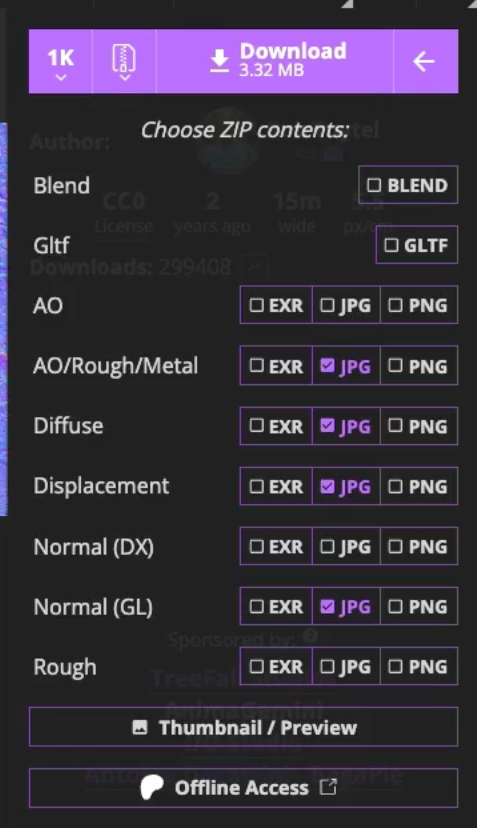
- alphaMap, map, aoMap, roughnessMap, metalnessMap, normalMap, displacementMap 등 사용
- 텍스처 repeat 설정:
texture.repeat.set(8, 8); texture.wrapS = THREE.RepeatWrapping; texture.wrapT = THREE.RepeatWrapping; - 색상 텍스처는 sRGB로 지정:
colorTexture.colorSpace = THREE.SRGBColorSpace;
조명(Lights)
Ambient, Directional, Door(포인트), Ghost 조명 사용
const ambientLight = new THREE.AmbientLight('#86cdff', 0.275);
const directionalLight = new THREE.DirectionalLight('#86cdff', 1);
const doorLight = new THREE.PointLight('#ff7d46', 5);
doorLight.position.set(0, 2.2, 2.5);
house.add(doorLight);
유령(Ghosts)
회전 + 위아래 애니메이션 적용된 PointLight 3개
const ghost1 = new THREE.PointLight('#8800ff', 6)
scene.add(ghost1)
...
// tick 함수 내부
const ghost1Angle = elapsedTime * 0.5
ghost1.position.x = Math.cos(ghost1Angle) * 4
ghost1.position.z = Math.sin(ghost1Angle) * 4
ghost1.position.y = Math.sin(ghost1Angle) * Math.sin(ghost1Angle * 2.34) * Math.sin(ghost1Angle * 3.45)
그림자(Shadows)
renderer.shadowMap.enabled = true;
renderer.shadowMap.type = THREE.PCFSoftShadowMap;
// Light 및 메쉬별 castShadow / receiveShadow 설정 필요
그룹으로 만든 graves는 graves.children을 통해 일괄 설정:
for (const grave of graves.children) {
  grave.castShadow = true;
  grave.receiveShadow = true;
}
하늘(Sky)
import { Sky } from 'three/addons/objects/Sky.js';
const sky = new Sky();
sky.scale.set(100, 100, 100);
scene.add(sky);
sky.material.uniforms['turbidity'].value = 10;
// 기타 파라미터 설정 필요
안개(Fog)
scene.fog = new THREE.FogExp2('#04343f', 0.1);
텍스처 최적화

- JPG → WEBP로 변환 (CloudConvert 등 사용)
- 압축 설정 예시: 80% 품질, 사이즈 512 또는 1024
- 프로젝트의 .jpg 경로를 .webp로 변경
- webp가 정답은 아니므로 다양한 포멧이 있으므로 탐색해서 적용해보자.
Squoosh : 한 번에 한 파일, 다양한 옵션, 실시간 미리보기
CloudConvert : 한 번에 여러 파일, 사용자 계정으로 매일 25개 이미지, 몇 가지 옵션
TinyPNG : 한 번에 여러 파일, 제한적이지만 잠시 기다릴 수 있음, 옵션 없음
마무리
- Three.js의 기본 기능만으로도 디테일한 장면 연출 가능
- 나중에 모델 임포트, 사운드, 고급 텍스처 포맷(Basis), Sky 파라미터 조정 등 확장 가능

import * as THREE from 'three';
import { OrbitControls } from 'three/examples/jsm/controls/OrbitControls.js';
import { Sky } from 'three/addons/objects/Sky.js';
import { Timer } from 'three/addons/misc/Timer.js';
import GUI from 'lil-gui';

/**
 * Base
 */
// Debug
const gui = new GUI();

// Canvas
const canvas = document.querySelector('canvas.webgl');

// Scene
const scene = new THREE.Scene();

/**
 * Textures
 */
const textureLoader = new THREE.TextureLoader();

// Floor
const floorAlphaTexture = textureLoader.load('./floor/alpha.webp');
const floorColorTexture = textureLoader.load(
  './floor/coast_sand_rocks_02_1k/coast_sand_rocks_02_diff_1k.webp',
);
const floorARMTexture = textureLoader.load(
  './floor/coast_sand_rocks_02_1k/coast_sand_rocks_02_arm_1k.webp',
);
const floorNormalTexture = textureLoader.load(
  './floor/coast_sand_rocks_02_1k/coast_sand_rocks_02_nor_gl_1k.webp',
);
const floorDisplacementTexture = textureLoader.load(
  './floor/coast_sand_rocks_02_1k/coast_sand_rocks_02_disp_1k.webp',
);

floorColorTexture.colorSpace = THREE.SRGBColorSpace;
// 반복 적용 시키기
floorColorTexture.repeat.set(8, 8);
floorARMTexture.repeat.set(8, 8);
floorNormalTexture.repeat.set(8, 8);
floorDisplacementTexture.repeat.set(8, 8);

floorColorTexture.wrapS = THREE.RepeatWrapping;
floorARMTexture.wrapS = THREE.RepeatWrapping;
floorNormalTexture.wrapS = THREE.RepeatWrapping;
floorDisplacementTexture.wrapS = THREE.RepeatWrapping;

floorColorTexture.wrapT = THREE.RepeatWrapping;
floorARMTexture.wrapT = THREE.RepeatWrapping;
floorNormalTexture.wrapT = THREE.RepeatWrapping;
floorDisplacementTexture.wrapT = THREE.RepeatWrapping;

// Wall
const wallColorTexture = textureLoader.load(
  './wall/castle_brick_broken_06_1k/castle_brick_broken_06_diff_1k.webp',
);
const wallARMTexture = textureLoader.load(
  './wall/castle_brick_broken_06_1k/castle_brick_broken_06_arm_1k.webp',
);
const wallNormalTexture = textureLoader.load(
  './wall/castle_brick_broken_06_1k/castle_brick_broken_06_nor_gl_1k.webp',
);

wallColorTexture.colorSpace = THREE.SRGBColorSpace;

// Roof
const roofColorTexture = textureLoader.load(
  './roof/roof_slates_02_1k/roof_slates_02_diff_1k.webp',
);
const roofARMTexture = textureLoader.load(
  './roof/roof_slates_02_1k/roof_slates_02_arm_1k.webp',
);
const roofNormalTexture = textureLoader.load(
  './roof/roof_slates_02_1k/roof_slates_02_nor_gl_1k.webp',
);

roofColorTexture.colorSpace = THREE.SRGBColorSpace;

roofColorTexture.repeat.set(3, 1);
roofARMTexture.repeat.set(3, 1);
roofNormalTexture.repeat.set(3, 1);

roofColorTexture.wrapS = THREE.RepeatWrapping;
roofARMTexture.wrapS = THREE.RepeatWrapping;
roofNormalTexture.wrapS = THREE.RepeatWrapping;

// Bush
const bushColorTexture = textureLoader.load(
  './bush/leaves_forest_ground_1k/leaves_forest_ground_diff_1k.webp',
);
const bushARMTexture = textureLoader.load(
  './bush/leaves_forest_ground_1k/leaves_forest_ground_arm_1k.webp',
);
const bushNormalTexture = textureLoader.load(
  './bush/leaves_forest_ground_1k/leaves_forest_ground_nor_gl_1k.webp',
);

bushColorTexture.colorSpace = THREE.SRGBColorSpace;

bushColorTexture.repeat.set(2, 1);
bushARMTexture.repeat.set(2, 1);
bushNormalTexture.repeat.set(2, 1);

bushColorTexture.wrapS = THREE.RepeatWrapping;
bushARMTexture.wrapS = THREE.RepeatWrapping;
bushNormalTexture.wrapS = THREE.RepeatWrapping;

// Door
const doorColorTexture = textureLoader.load('./door/color.webp');
const doorAlphaTexture = textureLoader.load('./door/alpha.webp');
const doorAmbientOcclusionTexture = textureLoader.load(
  './door/ambientOcclusion.webp',
);
const doorHeightTexture = textureLoader.load('./door/height.webp');
const doorNormalTexture = textureLoader.load('./door/normal.webp');
const doorMetalnessTexture = textureLoader.load('./door/metalness.webp');
const doorRoughnessTexture = textureLoader.load('./door/roughness.webp');

doorColorTexture.colorSpace = THREE.SRGBColorSpace;

// Grave
const graveColorTexture = textureLoader.load(
  './grave/plastered_stone_wall_1k/plastered_stone_wall_diff_1k.webp',
);
const graveARMTexture = textureLoader.load(
  './grave/plastered_stone_wall_1k/plastered_stone_wall_arm_1k.webp',
);
const graveNormalTexture = textureLoader.load(
  './grave/plastered_stone_wall_1k/plastered_stone_wall_nor_gl_1k.webp',
);

graveColorTexture.colorSpace = THREE.SRGBColorSpace;

graveColorTexture.repeat.set(0.3, 0.4);
graveARMTexture.repeat.set(0.3, 0.4);
graveNormalTexture.repeat.set(0.3, 0.4);

/**
 * House
 */
const houseMeasurements = {
  width: 4,
  height: 2.5,
  depth: 4,
}; // 값이 확정되지 않을 때는 이런 식으로 공통 값을 가진 객체를 만들어서 사용하는게 좋다.

// Floor
const floor = new THREE.Mesh(
  new THREE.PlaneGeometry(20, 20, 100, 100),
  new THREE.MeshStandardMaterial({
    alphaMap: floorAlphaTexture,
    transparent: true,
    map: floorColorTexture,
    aoMap: floorARMTexture,
    roughnessMap: floorARMTexture,
    metalnessMap: floorARMTexture,
    normalMapType: floorNormalTexture,
    displacementMap: floorDisplacementTexture,
    displacementScale: 0.3,
    displacementBias: -0.2,
  }),
);
floor.rotation.x = -Math.PI * 0.5;
gui
  .add(floor.material, 'displacementScale')
  .min(0)
  .max(1)
  .step(0.001)
  .name('floorDisplacementScale');
gui
  .add(floor.material, 'displacementBias')
  .min(-1)
  .max(1)
  .step(0.001)
  .name('floorDisplacementBias');
scene.add(floor);

// House container
const house = new THREE.Group();
scene.add(house);

// Walls
const walls = new THREE.Mesh(
  new THREE.BoxGeometry(
    houseMeasurements.width,
    houseMeasurements.height,
    houseMeasurements.depth,
  ),
  new THREE.MeshStandardMaterial({
    map: wallColorTexture,
    aoMap: wallARMTexture,
    roughnessMap: wallARMTexture,
    metalnessMap: wallARMTexture,
    normalMap: wallNormalTexture,
  }),
);
walls.position.y += houseMeasurements.height / 2; // += = 둘 다 가능
house.add(walls);

// Roof
const roof = new THREE.Mesh(
  new THREE.ConeGeometry(3.5, 1.5, 4),
  // 콘은 normals와 uv 속성이 만들어지는 방식 때문에
  // 텍스처가 비뚤어져 있고, 빛이 조금 이상하게 작용해서 의도치 않은 곳에 반사가 보이게된다.
  // 이를해결하기 위해서는 3D 소프트웨어에서 모델을 만들거나 지오메트리 속성을 직접 만드는 방법이 있다.
  new THREE.MeshStandardMaterial({
    map: roofColorTexture,
    aoMap: roofARMTexture,
    roughnessMap: roofARMTexture,
    metalnessMap: roofARMTexture,
    normalMap: roofNormalTexture,
  }),
);
roof.position.y = houseMeasurements.height + 1.5 / 2;
roof.rotation.y = Math.PI / 2 / 2;
house.add(roof);

// Door
const door = new THREE.Mesh(
  new THREE.PlaneGeometry(2.2, 2.2, 100, 100), // 세그먼트 수(정점)을 추가해야 문에 입체감이 생긴다.
  new THREE.MeshStandardMaterial({
    map: doorColorTexture,
    transparent: true,
    alphaMap: doorAlphaTexture,
    aoMap: doorAmbientOcclusionTexture,
    displacementMap: doorHeightTexture,
    displacementScale: 0.15,
    displacementBias: -0.04,
    normalMap: doorNormalTexture,
    metalnessMap: doorMetalnessTexture,
    roughnessMap: doorRoughnessTexture,
  }),
);
door.position.y = 1;
door.position.z = 2 + 0.01; // z-fighting 방지
house.add(door);

// Bushes
const bushGeometry = new THREE.SphereGeometry(1, 16, 16);
const bushMaterial = new THREE.MeshStandardMaterial({
  color: '#ccffcc',
  map: bushColorTexture,
  aoMap: bushARMTexture,
  roughnessMap: bushARMTexture,
  metalnessMap: bushARMTexture,
  normalMap: bushNormalTexture,
});
const bush1 = new THREE.Mesh(bushGeometry, bushMaterial);
bush1.scale.set(0.5, 0.5, 0.5);
bush1.position.set(0.8, 0.2, 2.2);
bush1.rotation.x = -0.75;

const bush2 = new THREE.Mesh(bushGeometry, bushMaterial);
bush2.scale.set(0.25, 0.25, 0.25);
bush2.position.set(1.4, 0.1, 2.1);
bush2.rotation.x = -0.75;

const bush3 = new THREE.Mesh(bushGeometry, bushMaterial);
bush3.scale.set(0.4, 0.4, 0.4);
bush3.position.set(-0.8, 0.1, 2.2);
bush3.rotation.x = -0.75;

const bush4 = new THREE.Mesh(bushGeometry, bushMaterial);
bush4.scale.set(0.15, 0.15, 0.15);
bush4.position.set(-1, 0.05, 2.6);
bush4.rotation.x = -0.75;

house.add(bush1, bush2, bush3, bush4);

// Graves
const graveGeometry = new THREE.BoxGeometry(0.6, 0.8, 0.2);
const graveMaterial = new THREE.MeshStandardMaterial({
  map: graveColorTexture,
  aoMap: graveARMTexture,
  roughnessMap: graveARMTexture,
  metalnessMap: graveARMTexture,
  normalMap: graveNormalTexture,
});

const graves = new THREE.Group();
scene.add(graves);

for (let i = 0; i < 30; i++) {
  const angle = Math.random() * Math.PI * 2;
  const radius = 3 + Math.random() * 4;
  const x = Math.sin(angle) * radius;
  const z = Math.cos(angle) * radius;

  // Mesh
  const grave = new THREE.Mesh(graveGeometry, graveMaterial);

  grave.position.x = x;
  grave.position.z = z;
  grave.position.y = (Math.random() * 0.8) / 2;

  grave.rotation.x = (Math.random() - 0.5) * 0.4;
  grave.rotation.y = (Math.random() - 0.5) * 0.4;
  grave.rotation.z = (Math.random() - 0.5) * 0.4;

  // Add to graves group
  graves.add(grave);
}

/**
 * Lights
 */
// Ambient light
const ambientLight = new THREE.AmbientLight('#86cdff', 0.275);
scene.add(ambientLight);

// Directional light
const directionalLight = new THREE.DirectionalLight('#86cdff', 1);
directionalLight.position.set(3, 2, -8);
scene.add(directionalLight);

// Door Light
const doorLight = new THREE.PointLight('#ff7d46', 5);
doorLight.position.set(0, 2.2, 2.5);
house.add(doorLight);

/**
 * Ghosts
 */
const ghost1 = new THREE.PointLight('#8800ff', 6);
const ghost2 = new THREE.PointLight('#ff0088', 6);
const ghost3 = new THREE.PointLight('#ff0000', 6);
scene.add(ghost1, ghost2, ghost3);

/**
 * Sizes
 */
const sizes = {
  width: window.innerWidth,
  height: window.innerHeight,
};

window.addEventListener('resize', () => {
  // Update sizes
  sizes.width = window.innerWidth;
  sizes.height = window.innerHeight;

  // Update camera
  camera.aspect = sizes.width / sizes.height;
  camera.updateProjectionMatrix();

  // Update renderer
  renderer.setSize(sizes.width, sizes.height);
  renderer.setPixelRatio(Math.min(window.devicePixelRatio, 2));
});

/**
 * Camera
 */
// Base camera
const camera = new THREE.PerspectiveCamera(
  75,
  sizes.width / sizes.height,
  0.1,
  100,
);
camera.position.x = 4;
camera.position.y = 2;
camera.position.z = 5;
scene.add(camera);

// Controls
const controls = new OrbitControls(camera, canvas);
controls.enableDamping = true;

/**
 * Renderer
 */
const renderer = new THREE.WebGLRenderer({
  canvas: canvas,
});
renderer.setSize(sizes.width, sizes.height);
renderer.setPixelRatio(Math.min(window.devicePixelRatio, 2));

/**
 * Shadows
 */
// Renderer
renderer.shadowMap.enabled = true;
renderer.shadowMap.type = THREE.PCFShadowMap;

// Cast and receive
directionalLight.castShadow = true;
ghost1.castShadow = true;
ghost2.castShadow = true;
ghost3.castShadow = true;

walls.castShadow = true;
walls.receiveShadow = true;
roof.castShadow = true;
floor.receiveShadow = true;

// Grave에 직접 접근할 수 없으므로 graves group children으로 접근한다.
// console.log(graves);
for (const grave of graves.children) {
  grave.castShadow = true;
  grave.receiveShadow = true;
}

// Mapping
directionalLight.shadow.mapSize.width = 256;
directionalLight.shadow.mapSize.height = 256;
directionalLight.shadow.camera.top = 8;
directionalLight.shadow.camera.right = 8;
directionalLight.shadow.camera.bottom = -8;
directionalLight.shadow.camera.left = -8;
directionalLight.shadow.camera.near = 1;
directionalLight.shadow.camera.far = 20;

ghost1.shadow.mapSize.width = 256;
ghost1.shadow.mapSize.height = 256;
ghost1.shadow.camera.far = 10;

ghost2.shadow.mapSize.width = 256;
ghost2.shadow.mapSize.height = 256;
ghost2.shadow.camera.far = 10;

ghost3.shadow.mapSize.width = 256;
ghost3.shadow.mapSize.height = 256;
ghost3.shadow.camera.far = 10;

/**
 * Sky
 */
const sky = new Sky();
sky.scale.set(100, 100, 100); // sky는 boxGeometry와 유사
scene.add(sky);

// console.log(sky.material);
sky.material.uniforms['turbidity'].value = 10;
sky.material.uniforms['rayleigh'].value = 3;
sky.material.uniforms['mieCoefficient'].value = 0.1;
sky.material.uniforms['mieDirectionalG'].value = 0.95;
sky.material.uniforms['sunPosition'].value.set(0.3, -0.038, -0.95);

/**
 * Fog
 */
// scene.fog = new THREE.Fog('#ff0000', 1, 13); // 색상, near(카메라 기준 시작) far(카메라 기준 불투명)
scene.fog = new THREE.FogExp2('#04343f', 0.1); // 카메라에서 멀어질수록 밀도가 커짐

/**
 * Animate
 */
// clock 대신 사용되고 여러 개를 불렀을 때 오류를 없앨 수 있다.
const timer = new Timer();

const tick = () => {
  // Timer
  timer.update();
  const elapsedTime = timer.getElapsed();

  //Ghost
  const ghost1Angle = elapsedTime * 0.5;
  ghost1.position.x = Math.cos(ghost1Angle) * 4;
  ghost1.position.z = Math.sin(ghost1Angle) * 4;
  ghost1.position.y =
    Math.sin(ghost1Angle) *
    Math.sin(ghost1Angle * 2.34) *
    Math.sin(ghost1Angle * 2.45);

  const ghost2Angle = -elapsedTime * 0.38;
  ghost2.position.x = Math.cos(ghost2Angle) * 5;
  ghost2.position.z = Math.sin(ghost2Angle) * 5;
  ghost2.position.y =
    Math.sin(ghost2Angle) *
    Math.sin(ghost2Angle * 2.34) *
    Math.sin(ghost2Angle * 2.45);

  const ghost3Angle = elapsedTime * 0.23;
  ghost3.position.x = Math.cos(ghost3Angle) * 6;
  ghost3.position.z = Math.sin(ghost3Angle) * 6;
  ghost3.position.y =
    Math.sin(ghost3Angle) *
    Math.sin(ghost3Angle * 2.34) *
    Math.sin(ghost3Angle * 3.45);

  // Update controls
  controls.update();

  // Render
  renderer.render(scene, camera);

  // Call tick again on the next frame
  window.requestAnimationFrame(tick);
};

tick();'Graphic > ThreeJS' 카테고리의 다른 글
| 18 Galaxy Generator (2) | 2025.07.28 |
|---|---|
| 17 Particle(Points) (3) | 2025.07.28 |
| 15 그림자(Shadow) (4) | 2025.07.26 |
| 14 조명(Light) (0) | 2025.07.26 |
| 13 Go Live (1) | 2025.07.23 |


